

Comparison
Best apps to organize saved TikToks (2026)
Short answer
Use TikTok's own collections if folders are enough, Dewey to back up the Favorites you already have from a computer, and PickTok to file new TikToks into folders on your phone. If you want to find a video by what was in it, pick an app that reads each save for you; the table below shows which ones run on Android and which keep a copy.
Updated November 18, 2026 5 min read
What changed: Re-checked every app's listing and price, dropped TikMark (no update since April 2025) and ReelSave, and added Stasht, Tote and Sorti.
How to pick
Four questions settle it.
Are folders enough?
Tap Profile, then Favorites, then Collections.
TikTok's own collections are free and built in. Make one per reason, like Recipes or Gym. You can also share a collection with a friend when you both follow each other.
Is the pile already in TikTok?
Most apps only see what you share to them from now on. Dewey syncs the Favorites and collections you already have from a computer and keeps a copy of each video. SavedIt's Magic Import brings them in once from Chrome on your laptop.
Do you need to find a video by what was in it?
TikTok's Favorites help page describes no search. Folder apps find things by where you filed them. Stasht, Tote, Sorti and SavedIt sort and search for you; of these, only SavedIt says it reads what is said in the video.
What if the creator deletes it?
TikTok doesn't keep a copy for you. Dewey does. Apps that save the link, like SavedIt, keep what they read but not the video.
What each one costs, and what changed
- TikTok: Favorites are private, collections can be shared
- Only you can see what you favorite. Since December 2025 you can share a collection with a friend when you both follow each other, or make it public, on accounts over 16.Source: TikTok Support: favoriting content
- Dewey: free plan and Pro
- Dewey's free plan syncs by hand with one account. Pro syncs on its own and costs $10 a month, or $7.50 a month billed yearly. You start the first TikTok sync on a computer.Source: Dewey pricing
- PickTok: free, with Premium
- PickTok is free on iPhone and Android, with a Premium upgrade listed at $9.99 on the App Store. It files a video into a folder from TikTok's share button.Source: PickTok on the App Store
- Stasht: free, sorts itself
- Stasht takes TikToks and Reels from the share button, sorts them with no folders, and pulls out places and events. Its App Store listing shows no paid plan.Source: Stasht on the App Store
- Tote and Sorti: new, well rated
- Tote (iPhone only, with a $29.99 yearly plan) and Sorti (iPhone and Android, free) read what you share and sort it by type. Both were updated this autumn.Source: Tote on the App Store
The apps, side by side
Swipe sideways to see every column.
| App | Best for | Where it shines | Where it falls short |
|---|---|---|---|
| TikTok collections | Simple folders inside TikTok. | Free, nothing to install. Collections can be shared with a friend who follows you back, or made public. | TikTok's help describes no search of your Favorites, nothing sorts itself, and TikTok doesn't keep a copy for you if a creator deletes a video. |
| Dewey | Backing up the TikTok Favorites you already have, from a computer. | Syncs your Favorites and collections, which become folders, and keeps a copy of each video. Also syncs Instagram, X, Reddit and more. | Works through a browser extension and a web dashboard; there's no phone app. The free plan syncs by hand, and folders and tags are paid. |
| PickTok | Filing TikToks into folders from your phone. | Save straight to a colour-coded folder from TikTok's share button, with subfolders. Also takes Reels and Shorts. On iPhone and Android, rated 4.6. | Folders only: you find a video by where you filed it. Premium is a paid upgrade. |
| Stasht | Free sorting with no folders, plus places and events on a map. | Share TikToks and Reels to it; it sorts them, pulls out places, events and prices, and searches by place, tag or a word. On iPhone, Android and a computer. | Its listing doesn't say it reads what's said in a video. Small so far: 33 ratings on the App Store, and the iPhone app needs iOS 26. |
| Tote | Sorting TikToks and screenshots on an iPhone. | Share from any app or save a screenshot; it pulls out the details, sorts by type and makes them searchable. Rated 4.7 from 178. | iPhone and iPad only, iOS 26 and up. A yearly plan is $29.99. |
| Sorti | Free sorting into categories, on iPhone and Android. | Sorts screenshots, posts and TikToks into categories on its own, with a map of saved places and search by text or voice. Free. | Its listing doesn't say it reads the video itself. Rated 4.8 from 62 on the App Store. |
| SavedIt | Finding a TikTok by what was said in it, next to everything else you save. | Share from TikTok without leaving the video. It reads what's said, or the words on screen, writes the key points and finds the video by meaning. Collections, sharing, and Magic Import from Chrome. Free on iPhone, Android and the web. | It keeps the link and what it read, not the video, so a deleted TikTok leaves you the notes. Free reads 12 videos a month; Plus reads 500. There's no copy kept like Dewey's. |
Where SavedIt fits
SavedIt is for people who save TikToks and also Reels, YouTube videos and links, and want to find a video by what was in it.
Share the TikTok to SavedIt
Tap Share, then SavedIt.
Tap Share on the video, then SavedIt. You stay in TikTok while it saves, and you can pick a collection first.
It reads the video for you
SavedIt reads what's said, or the words on screen when nobody speaks, and writes the key points under the save. Free reads 12 videos a month, Plus 500.
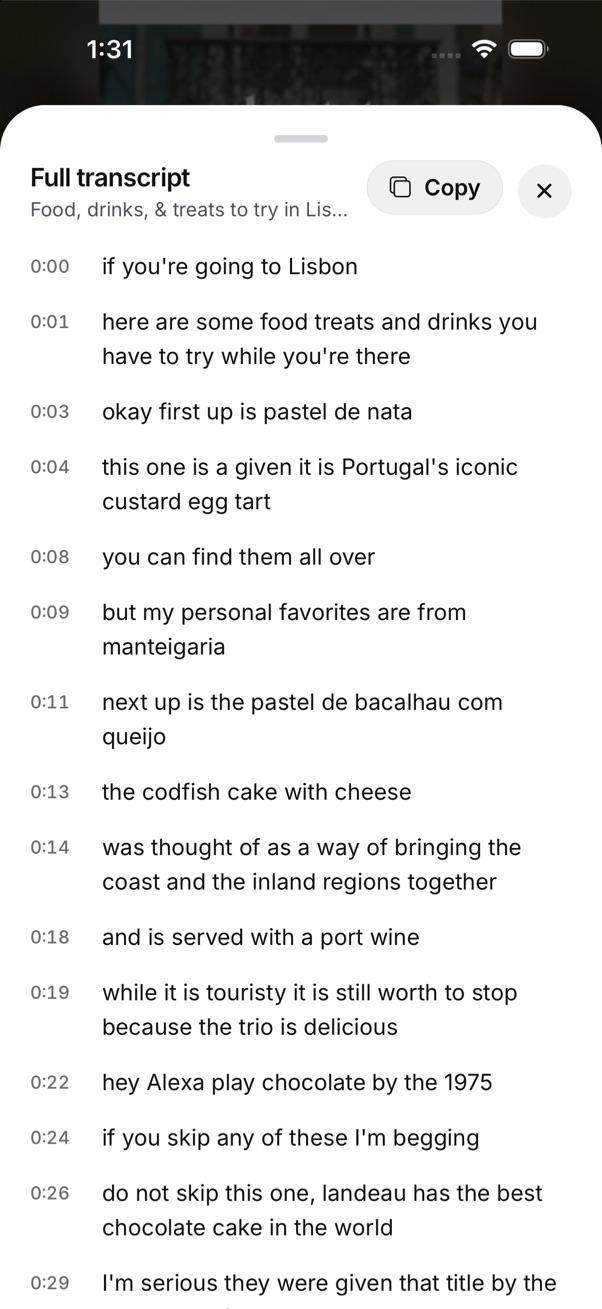
Every word said in a saved video, with a Copy button. Collections, with suggestions
Make collections like Recipes or Trips, or keep the ones SavedIt suggests. Each save also gets its reason, like to make or to go. Filing new saves on their own (Magic sort) is Plus.
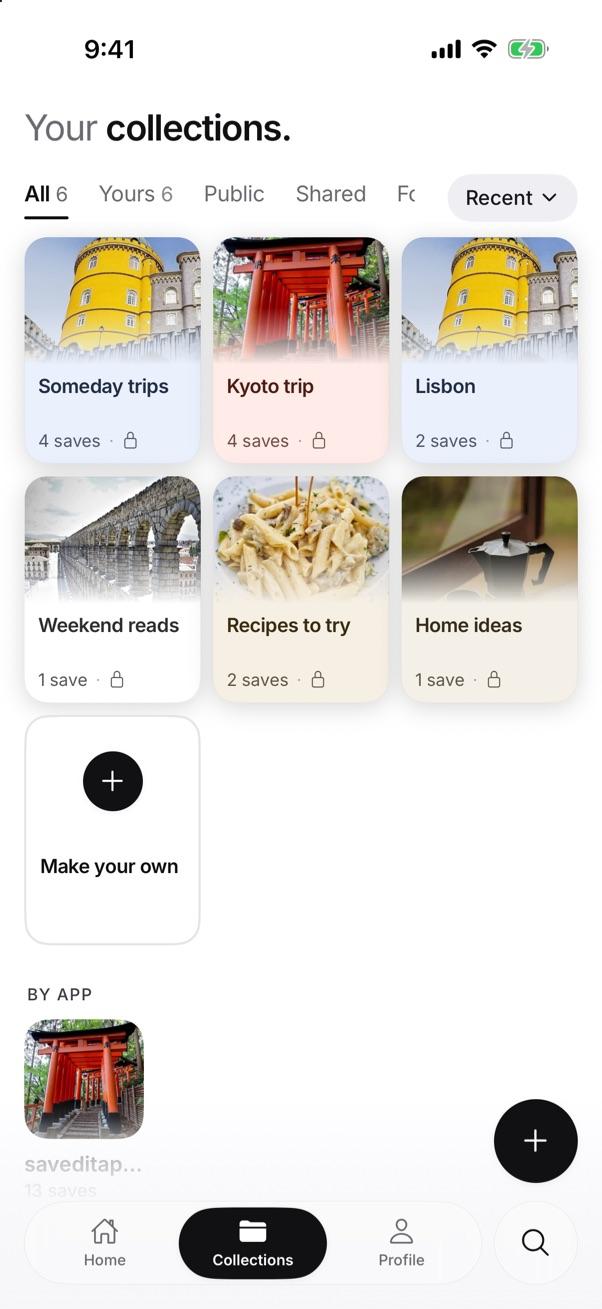
Your collections, with a cover from what's inside. Bring your Favorites over on a laptop
Tap SavedIt extension, then Magic Import, then TikTok.
In Chrome, Magic Import opens your TikTok Favorites and brings them into SavedIt, up to 2,000 at a time. You pick what comes in.
Questions people ask
What is the best app to organize saved TikToks?
It depends on how you find things. PickTok if you like folders on your phone, Dewey to back up your Favorites from a computer, Stasht or Sorti for free sorting, and SavedIt to search by what was said in the video.
Can I search my saved TikToks?
TikTok's help describes no search of your Favorites. Apps that sort for you (Stasht, Tote, Sorti, SavedIt) let you search what you share to them. SavedIt also searches the words said in the video.
What happens if a creator deletes a TikTok I saved?
TikTok doesn't keep a copy for you. Dewey keeps a copy of the video. SavedIt keeps the link and what it read, like the key points, but not the video.
My Favorites aren't showing. What do I do?
TikTok's help says to update the app, then force close and reopen it, and if the button doesn't respond, clear TikTok's cache and restart your phone.
Is SavedIt free?
Yes. Saving, collections and Magic search are free on your phone or laptop. Free reads 12 videos a month; Plus reads 500 and adds Magic sort.
More guides
- Save Instagram, TikTok, YouTube, Reddit and X posts in one place
- Where are my saved TikToks, and how do I search them?
- How to export your TikTok favorites
- How to save TikTok videos to Favorites or your phone
Free on iPhone and Android
Your saved TikToks, sorted and searchable
SavedIt is free on iPhone, Android and the web. Share a TikTok to start.