Where are saved posts on Instagram? Find them and search them
Short answer
Open your profile, tap the menu in the top right, then Saved. Every post and Reel you ever saved is under All posts, newest first.
Updated October 27, 2026 2 min read
Find them in Instagram
Open Saved
Tap Profile, then Menu, then Saved.
Tap the menu in the top right, then Saved. On a computer, click your profile picture, then Saved.
Start in All posts
All posts holds everything you saved, including posts you filed into a collection. Collections only show what you put in them.
Scroll for it
There is no search box in Saved, so you scroll. Posts are in the order you saved them, newest at the top.
File it so it's quicker next time
Tap Hold the save icon, then Choose a collection.
Press and hold the save icon on any post to drop it straight into a collection like Recipes or Japan trip.
What Instagram Saved can't do
- No search
- You can't type a word and find a saved post. Not the caption, not the account, not the place.
- No sort or filter
- Saved is one long list in the order you saved things. Reels, photos and carousels are mixed together.
- Filing is on you
- Nothing sorts itself. Unless you picked a collection when you saved, a post is only in All posts.
- No note on a save
- Saved shows a cover image and nothing else. You can't write down why you kept a post.
Search everything you saved by what you remember
SavedIt reads each post you save, writes down what's in it, and lets you find it later with whatever you remember: a dish, a city, a word from the caption.
Save new posts without leaving Instagram
Tap Share, then SavedIt.
On a post or Reel, tap the paper plane, then Share, then SavedIt. You stay in Instagram, and you can add a note while it saves.
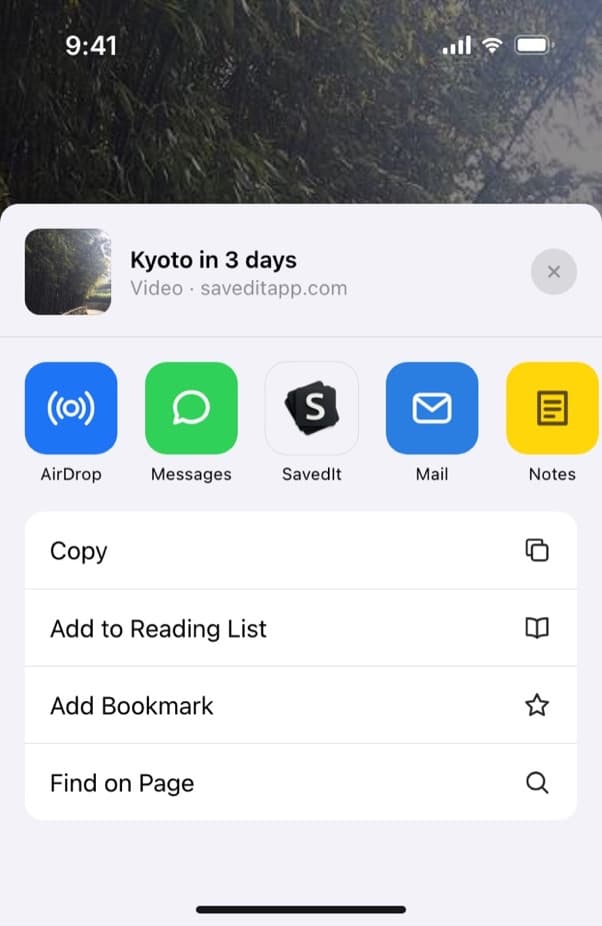
Share any post or Reel from Instagram to SavedIt. Search the way you remember it
Type "lemon pasta" or "that rooftop bar in Lisbon". No match on the words? One tap searches by meaning.
Open the original any time
Every save keeps its link. One tap takes you back to the post in Instagram, with the creator's comments and the full video.
Questions people ask
Can other people see my saved posts on Instagram?
No. Saved is private. Only a collaborative collection is shared, and only with the people you invite.
Why did a saved post disappear?
Usually the creator deleted or archived it. When that happens it drops out of your Saved list.
Is there a limit to how many posts I can save on Instagram?
Instagram doesn't publish one. The real limit is finding things: past a few hundred saves, scrolling stops working.
More guides
Free on iPhone and Android
Stop scrolling for the post you saved
Save it to SavedIt and find it by what you remember.