

X
How to export your X (Twitter) bookmarks
Short answer
X has no button to export bookmarks, and its data archive doesn't list them. To get them out, use an export tool or connect X to an app that reads them, like SavedIt.
Updated November 24, 2026 3 min read
What X gives you
X (formerly Twitter) keeps your bookmarks private, but it has no way to download them. Here's where they are and what you can do inside X.
Open your bookmarks
Tap Profile picture, then History, then Bookmarks.
On iPhone, X renamed Bookmarks to History in May 2026: tap your profile picture, then History, then the Bookmarks tab. On Android, most accounts still have Bookmarks in the side menu. On a computer, click Bookmarks in the left sidebar or go to x.com/i/bookmarks.
Check your archive
Tap Settings and privacy, then Your account, then Download an archive of your data.
Enter your password, verify with the code X sends, then request the archive. X emails you when it's ready, which can take a few days. Unzip it and open the data folder. Guides from 2026 found no bookmarks file there, so look, but don't count on it.
Copy the links you need
Tap Share, then Copy link.
On a bookmarked post, tap the share icon, then Copy link, and paste it where you keep notes. It works for a handful of posts, not for hundreds.
Use an export tool
Browser extensions and apps can save your bookmarks as a file, like CSV or JSON. They read your X account while they run, so check what each one asks for before you add it.
What X does and doesn't do with bookmarks
- No export button
- X has no button to download or export bookmarks, in the app, on the web or with Premium.Source: Marqly, August 2026
- The archive doesn't list bookmarks
- Guides that opened the archive in 2026 found no bookmarks file, and tools that read the archive say they aren't in it.Source: Stashr, October 2026
- The archive takes time
- Your email address must be confirmed before you request it. X can take a few days to prepare the file, then emails you and sends a notification in the app.Source: X Help Center
- Bookmarks are private
- Only you can see your bookmarks. Anyone can see how many times a post was bookmarked, but not who bookmarked it.Source: X Help Center
- Bookmarks moved on iPhone
- In May 2026, X renamed Bookmarks in the iPhone side menu to History. Bookmarks is now a tab there, next to Likes, Videos and Articles.Source: TechCrunch, May 2026
- Android and the web still say Bookmarks
- As of fall 2026, most Android accounts still have Bookmarks in the side menu, and x.com/i/bookmarks opens them on a computer.Source: ContextBolt, November 2026
- Folders need Premium
- Bookmark folders are a Premium feature. Without Premium, every bookmark sits in one list.Source: X Premium
Keep them in SavedIt with X Sync
X Sync is part of SavedIt Plus. Connect X once, choose the bookmarks to bring in, and turn on Keep X in sync so the ones you bookmark on X later show up in SavedIt on their own. You search them next to everything else you saved.
Connect X
Tap +, then Import saves, then Import from X, then Connect X.
The connection is read-only. SavedIt reads your bookmarks and can't post, like or change anything on X. You can disconnect any time.
Choose the bookmarks to bring in
SavedIt lists your recent X bookmarks. Pick the ones you want, then tap Import.
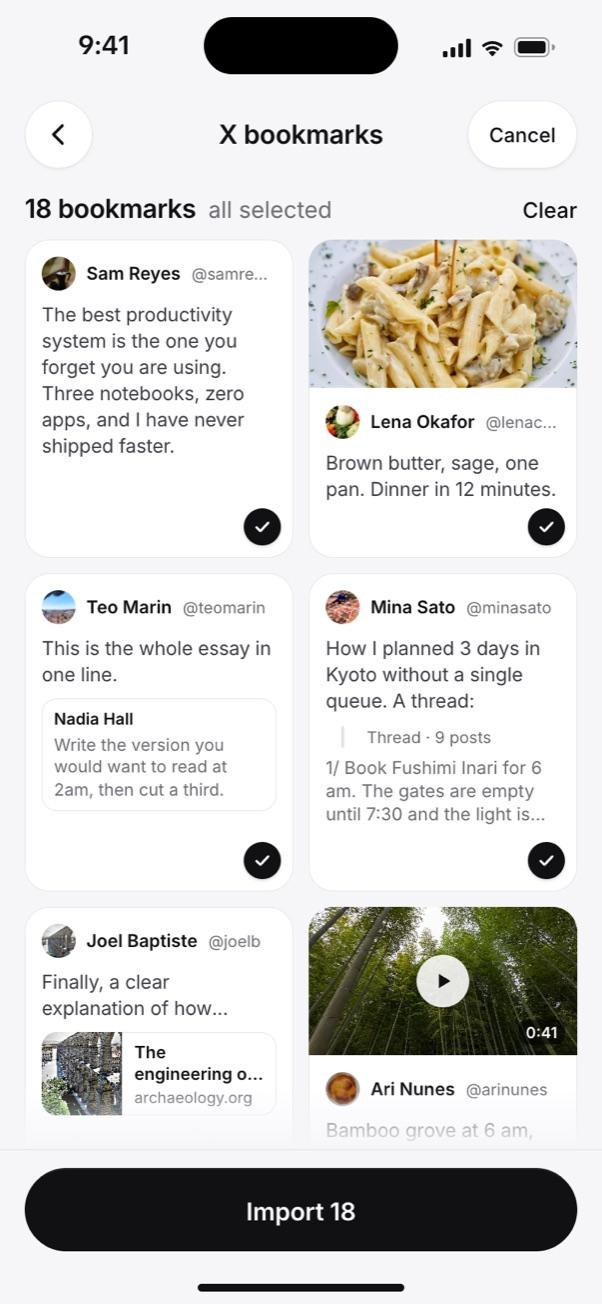
Pick the bookmarks to keep, then tap Import. Keep X in sync
Tap +, then Import saves, then Import from X, then Keep X in sync.
Turn it on and the posts you bookmark on X come into SavedIt on their own, so you don't have to share them. Tap Sync now when you want the newest ones in.
Bookmarks only, never likes
X Sync reads bookmarks and nothing else. To keep a post you liked, bookmark it on X or share it to SavedIt.
Search them by what you remember
Type a word from the post. If the words find nothing, tap Search by meaning and describe it, like "that thread about cold emails".
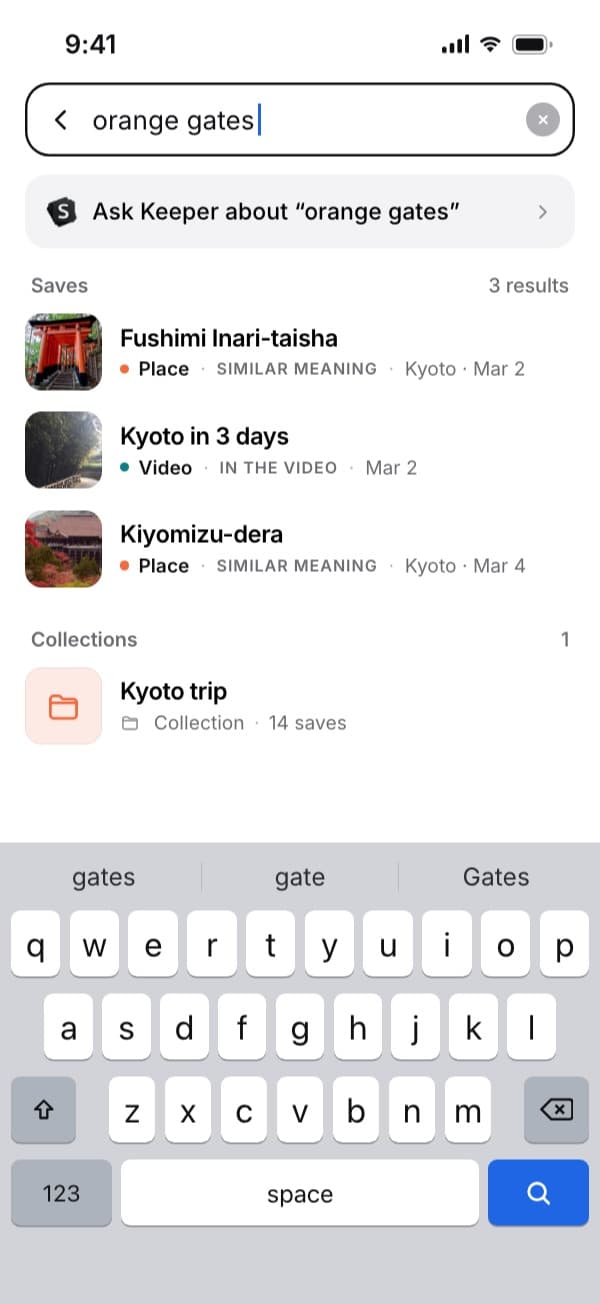
Here "orange gates" finds the Kyoto video by what's said in it. Need a file? Export from SavedIt
Tap Settings, then Library, then Your data.
SavedIt makes a zip with a CSV of all your saves and their links, including the X posts it brought in.
Questions people ask
Can you export bookmarks from X?
Not with X's own tools. There's no export button, and the data archive doesn't list bookmarks. Export tools and SavedIt's X Sync read them from your account.
Does the X archive include bookmarks?
X's help page doesn't list them, and 2026 guides that opened the archive found no bookmarks file. Check the data folder in your own archive.
Where are my bookmarks on X now?
On iPhone, in History: tap your profile picture, then History, then Bookmarks. On Android and x.com, most accounts still have Bookmarks in the menu.
Does SavedIt bring in my X likes?
No. X Sync reads bookmarks only. Share a liked post to SavedIt to keep it.
Do I need Plus for X Sync?
Yes. X Sync is part of SavedIt Plus. Sharing a single post to SavedIt works without it.
More guides
- Save Instagram, TikTok, YouTube, Reddit and X posts in one place
- How to find your bookmarks on X, and search them
- Where are my likes on X? How to find liked posts
Free on iPhone and Android
Get your X bookmarks out of X
Bring them into SavedIt, keep new ones coming, and export a file when you need one.