

Why did my Instagram saved posts disappear? How to keep them
Short answer
Instagram's Saved shows a post only while its creator still shares it, so a save disappears when the creator deletes or archives it, makes the account private and you don't follow it, or closes the account, or when Instagram takes it down. Instagram's help pages describe no way for you to see it after that, though a creator can restore a post they deleted within 30 days.
Updated November 18, 2026 4 min read
What changed: Checked each cause against Instagram's help pages, added the wrong-account and 30-day checks, and what Instagram's export does and doesn't keep.
Check where it went, in this order
The first three checks take a minute and find most "missing" saves.
Are you on the right account?
Saves belong to the account that saved them. If you use more than one, switch to the other and look again.
Look in All posts, not a collection
Tap Profile, then Menu, then Saved, then All posts.
Taking a post out of a collection doesn't unsave it, and Instagram keeps it in All posts. The save icon is also a switch: tap it again on a post and the save is gone, so re-save anything you unsaved by mistake.
Check on a computer
Tap instagram.com, then Profile picture, then Saved.
If a whole group of saves vanished at once, open Saved on instagram.com. If they're there, the posts are fine and the app on your phone is the problem: update it, or log out and back in.
Visit the creator's profile
If the account is there but the post isn't, the creator deleted or archived it. "This account is private" means you now need to follow them. No account in search means it was deactivated or deleted.
Ask the creator, soon
A post its creator deleted waits in their Recently Deleted for 30 days, and they can restore it. An archived post can be shown again any time. A friendly message is the only way to get either back.
Why saved posts disappear, from Instagram's own pages
- The creator deleted it
- Instagram says a post its creator deletes is no longer visible to anyone. It sits in the creator's Recently Deleted for 30 days, where they can restore it or delete it for good. You can't see it there.Source: Instagram Help: content you delete
- The creator archived it
- Archiving hides a post from everyone but its creator, with its likes and comments kept. The creator can show it again later.Source: Instagram Help: archive a post
- The account went private
- A private account's photos and videos show only to its followers. If you don't follow it, you can't see its posts, saved or not.Source: Instagram Help: public and private accounts
- The account was deactivated or deleted
- A deactivated account's posts are hidden until the person logs back in. A deleted account's photos and videos are removed for good.Source: Instagram Help: deactivate your profile
- Instagram took it down
- Instagram removes posts that go against its Community Guidelines. People also report that a creator who blocks you disappears from your Saved; Instagram's help pages don't say either way.Source: Instagram Help: removed posts
- Instagram's export won't bring a post back
- You can export a copy of your Instagram information from Accounts Center. It covers your own activity, not other people's photos, and people who have exported report that saves arrive as links. A link to a deleted post still won't open.Source: Instagram Help: export your information
Keep what mattered about a post, even when the post goes
Instagram's Saved can only show posts that are still there. SavedIt writes down what each post was about when you save it, in a library that's yours. It can't bring back a post that is already gone.
Bring over what's in Saved today
Tap SavedIt extension, then Magic Import, then Open my Instagram saves.
On a laptop, Magic Import in Chrome opens your Instagram Saved and brings the posts into SavedIt, up to 2,000 at a time. You pick what comes in. Do it now, while the posts still open.
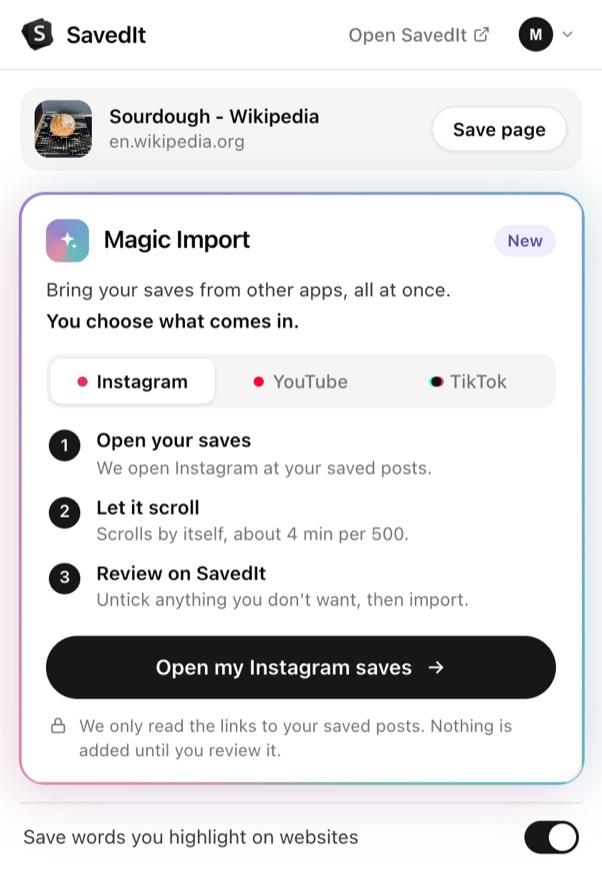
Magic Import in the SavedIt extension for Chrome. Save new posts to SavedIt as you go
Tap Paper plane, then Share, then SavedIt.
On a post or Reel, tap the paper plane, then Share, then SavedIt. Add a note on why you kept it while it saves.
What stays if the post goes
SavedIt keeps the link, the caption and your note, plus the key points and the transcript when it has read the post. It does not keep the video or the photos, so a deleted post won't play, but you still know what it was and who made it.
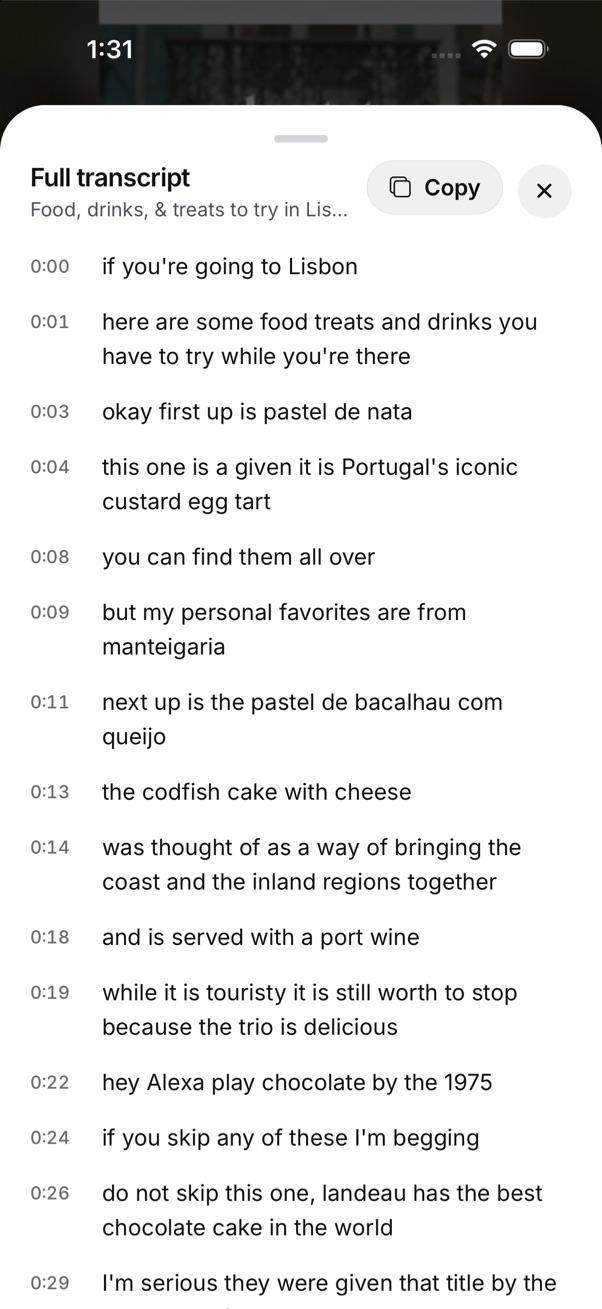
What SavedIt wrote down from a saved video, with a Copy button. Take everything with you
Tap Settings, then Library, then Your data.
Tap Export to download all your saves, notes and voice notes as one file whenever you want, and import it again later. Photos and files you stored aren't in it. On the web it's in Settings too.
Questions people ask
Can I get back a saved post that disappeared?
Only if the creator brings it back: by restoring it from Recently Deleted within 30 days, unarchiving it, reactivating the account, or accepting your follow. Instagram's help pages describe no way for you to see it otherwise.
Does Instagram limit how many posts I can save?
Instagram doesn't publish a limit. People with very large Saved lists do report posts that fail to load, so check on a computer before assuming they're gone.
Does the creator know I saved their post?
No. Instagram says only you can see what you saved, and the creator can't tell.
Will SavedIt keep a post if the creator deletes it?
It keeps the link, the caption and your note, plus the key points when it has read the post, so you still know what the post was and who made it. It doesn't keep the photo or video file, so a deleted post won't play.
More guides
- Save Instagram, TikTok, YouTube, Reddit and X posts in one place
- Where are saved posts on Instagram? Find them and search them
- How to export your saved Instagram posts
Free on iPhone and Android
Your saves, in a library that's yours
SavedIt is free on iPhone, Android and the web. Bring your Instagram saves in, then search them.