

TikTok
Where is TikTok watch history? Find a video you watched
Short answer
Tap Profile, then the Menu button at the top, then Activity center and Watch history. Tap a video in the list to watch it again.
Updated November 2, 2026 5 min read
Find a video you watched in TikTok
Watch history is in the TikTok app, inside Activity center. TikTok's help pages show two ways into Activity center: straight from the Menu button on your profile, or through Settings and privacy.
Open Activity center
Tap Profile, then Menu, then Activity center.
Tap Profile at the bottom, then the Menu button (three lines) at the top. Activity center is in that menu. It also holds your screen time summary.
Not in the menu? Look in Settings and privacy
Tap Profile, then Menu, then Settings and privacy, then Activity center.
If the menu doesn't show Activity center, tap Settings and privacy, then Activity center.
Open Watch history
Tap Activity center, then Watch history.
Tap Watch history to see the videos you've watched. Tap one to play it again. If it's one you want to keep, share it or save it now.
Delete some or all of it
Tap Watch history, then Select, then Delete.
Tap Select at the top, then tick the videos you want gone. Tap Delete and confirm.
Get it in your data file
Tap Profile, then Menu, then Settings and privacy, then Account, then Download your data.
Your TikTok data file can include your watch video history. Choose what to include and a file format, then tap Request data. TikTok tells you in the app when the file is ready, which can take a few days. Download it from the Download data tab within 4 days, or it expires and you request it again.
What else to know about TikTok watch history
- Activity center also shows your screen time
- The screen time summary in Activity center counts your time on TikTok each day of the current week, across the app and the web. You can look back up to 3 weeks.Source: TikTok Help Center
- Duets of your videos are listed there too
- Activity center has Reuse of content history, which lists Duets other people made with your videos. Choose a video and tap More options to manage them.Source: TikTok Help Center
- Post view history is a different setting
- Post view history lets people see that you viewed their posts. With it on, people you follow who also have it on see that you viewed their posts from the last 7 days. Only people 16 or older with fewer than 5,000 followers have the feature. When you like or comment on someone's post, it shows as a view to them even if your setting is off. Turn it on or off under Settings and privacy, Privacy, Post views.Source: TikTok Help Center
- Story views always show
- People can see that you viewed their Story even if your account is private or your profile view history is off.Source: TikTok Help Center
- Profile view history is separate again
- It shows who visited your profile in the past 30 days, and only when both of you have it on. It's off by default. Turn it on or off under Settings and privacy, Privacy, Profile views.Source: TikTok Help Center
- Search history is its own list
- The words you typed into TikTok search are kept separately. Tap Search, then Clear search next to any term to remove it.Source: TikTok Help Center
- The data file runs a day or two behind
- The last 24 to 48 hours of some data can be missing from your file. Request it again later if you need the videos you watched most recently.Source: TikTok Help Center
Rescue the video once you find it
Watch history lists every video you watch, so the one you dug for is one more row in a long list. Once you find it, send it to SavedIt. Next time you search for the part you remember instead of scrolling.
Found it in Watch history? Share it before it's gone
Tap Share, then SavedIt.
Play the video from Watch history, tap Share on the side and pick SavedIt from your phone's share menu. You stay in TikTok while it saves. Add a note with the detail you'll remember, like "the cafe with the cat on the counter". Prefer the link? Copy it in TikTok, open SavedIt, tap +, then Save a link and paste it.
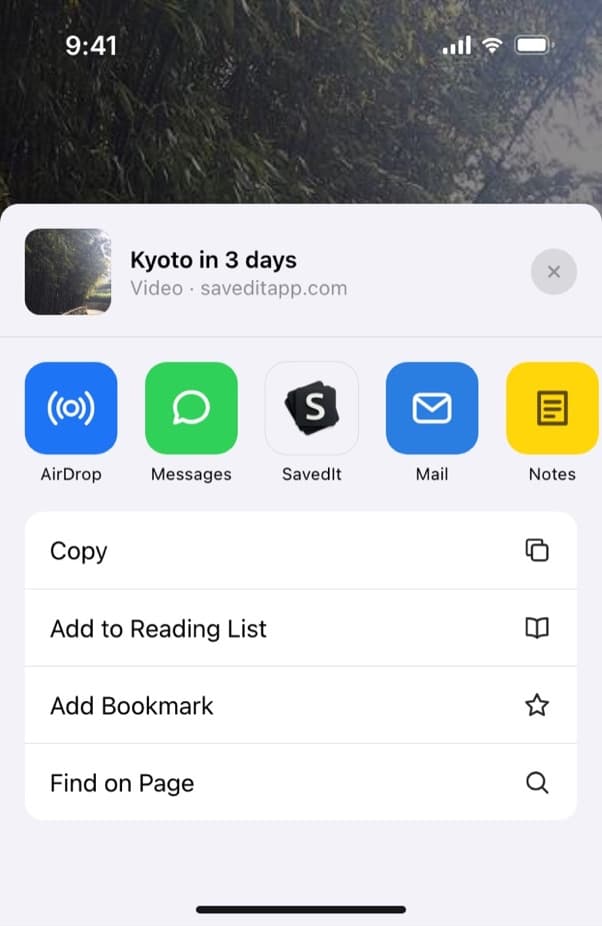
SavedIt waits in the share menu, right from Watch history. Search for the part you half remember
A month from now you won't know the creator or the day you watched it. Type the word you do remember: the cafe, the song, the city. If the words find nothing, tap Search by meaning and describe the video, like "the cat asleep next to the espresso machine". Word search is free. Free accounts get a number of meaning searches each month, and Plus has no limit.
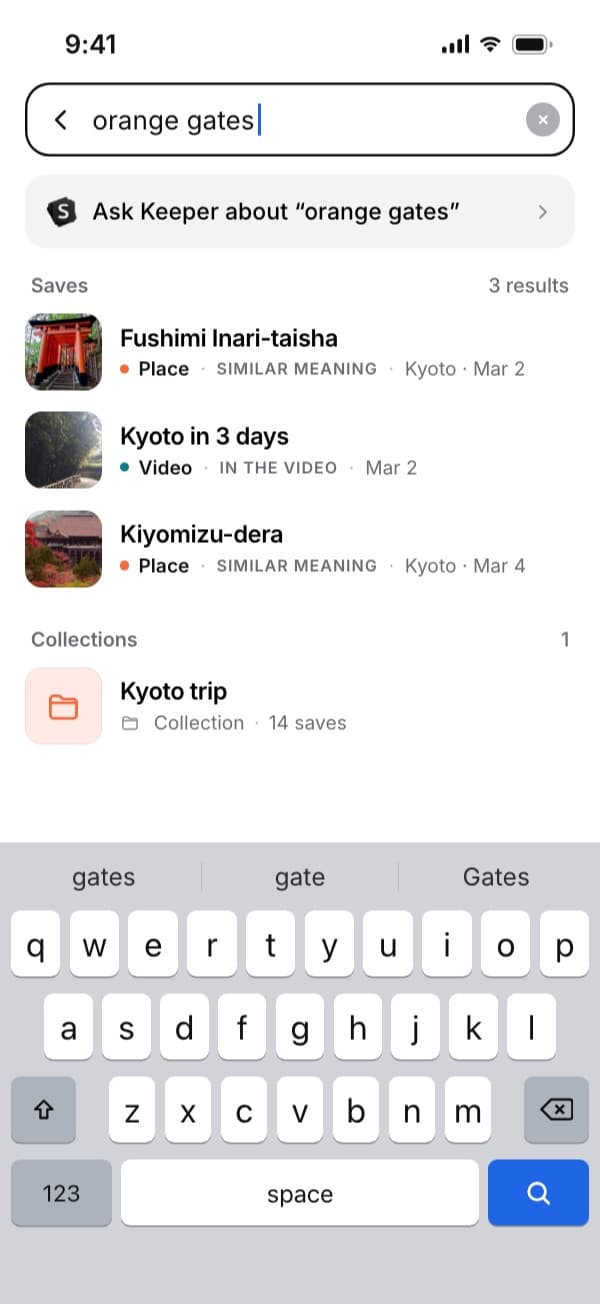
Two words you kept, "orange gates", bring back the Kyoto video. Open the original in TikTok
Every save keeps its link, so one tap opens the video in TikTok. SavedIt keeps the link and what it reads from the post, never a downloaded copy. If the creator deletes the video, the link stops working, and your note stays with the save.
Questions people ask
Where is watch history on TikTok?
Tap Profile, then the Menu button, then Activity center and Watch history. If Activity center isn't in the menu, open Settings and privacy, then Activity center.
Why don't I see Watch history in TikTok?
Update TikTok to the latest version first. Then check both paths to Activity center: straight from the Menu button on your profile, and through Settings and privacy.
How do I find a TikTok I watched but didn't like or save?
Open Watch history and scroll back to around when you saw it. If that fails, search TikTok for the creator, the sound or a word from the caption, then tap More options and Filters to narrow the results.
How do I clear my TikTok watch history?
Open Watch history, tap Select, tick the videos you want gone, and tap Delete.
Can creators see that I watched their TikTok?
Through Post view history, if they're someone you follow and you both have it on. It covers posts from the last 7 days, and only people 16 or older with fewer than 5,000 followers have it. A like or a comment shows as a view either way. Story views always show, even on a private account.
Can I get a copy of my TikTok watch history?
Yes. Request your data under Settings and privacy, Account, Download your data. The file can include your watch video history and stays available for 4 days once it's ready.
More guides
Free on iPhone and Android
Find a saved TikTok by the dish, the place or the creator
SavedIt keeps the link and what it reads from the post, and one tap opens the video in TikTok.