

How to see your Instagram watch history, and clear it
Short answer
Open your profile, tap the menu in the top right, then Your activity, then Watch history. To remove Reels from it, tap Select, tap the Reels, then tap Remove.
Updated November 2, 2026 5 min read
See and clear it in Instagram
Instagram added Watch history in October 2025, so any page that says Instagram keeps no history of the Reels you watch is out of date. These steps are for the Instagram app on iPhone and Android, and the menus are the same on both.
Open Your activity
Tap Profile, then Menu, then Your activity.
Go to your profile and tap the three lines in the top right. Your activity sits under How you use Instagram, with your likes, comments and other things you've done on Instagram.
Open Watch history
Tap Your activity, then Watch history.
Scroll to the bottom of Your activity and tap Watch history. You see the Reels you've watched. Tap one and it plays again.
Narrow it down by date
Sort from newest to oldest, or oldest to newest. Then pick a date range: All dates, Past week, Past month, or your own start and end dates. If you watched it on a Sunday night two weeks ago, set just that weekend and the list gets short fast.
Narrow it down by account
Filter by author and pick the account that posted it to see only that account's Reels. This is the quickest way in when you remember who posted it but not when you saw it.
Remove Reels from it
Tap Watch history, then Select, then Remove.
Tap Select in the top right, tap the thumbnails of the Reels you want off the list, then tap Remove. They come off your Watch history list, and the rest stay.
What Watch history does and doesn't do
- It's new since October 2025
- Adam Mosseri, the head of Instagram, announced Watch history on October 24, 2025. Before that, a Reel you watched but didn't like or save was hard to get back to.Source: Adam Mosseri on Instagram
- It's a list of Reels
- Watch history shows the Reels you've watched, including ones you never liked or saved.Source: TechCrunch
- Photos you liked are in Likes
- For a photo or carousel, look in Your activity under Interactions, then Likes. It shows the 300 most recent posts you liked.Source: Instagram Help
- You sort it by date and filter it by account
- Sort it newest or oldest first, pick All dates, the past week, the past month or your own date range, and filter by the account that posted.Source: 9to5Mac
- You can take Reels out of it
- Instagram lets you remove Reels from your watch history. You pick which ones, so a Reel you'd rather not have in the list comes off and the rest stay.Source: TechCrunch
- Creators see counts, not a list of accounts
- Reel insights give the creator counts, like views and viewers. They don't include a list of accounts.Source: Instagram Help
Keep the Reels worth finding, and search them by what you remember
Watch history is a record of everything you played, and it doesn't know which Reels mattered to you. SavedIt is for the few Reels you want again. Share one to SavedIt and you find it later by the dish, the place or a word you remember, not by the day you watched it.
Share the Reel to SavedIt
Tap Share, then SavedIt.
On the Reel, tap the paper plane, then Share, then SavedIt. You stay in Instagram while it saves. This works from your feed, from the Reels tab, and from a Reel you just found in Watch history, so you never dig for it twice.
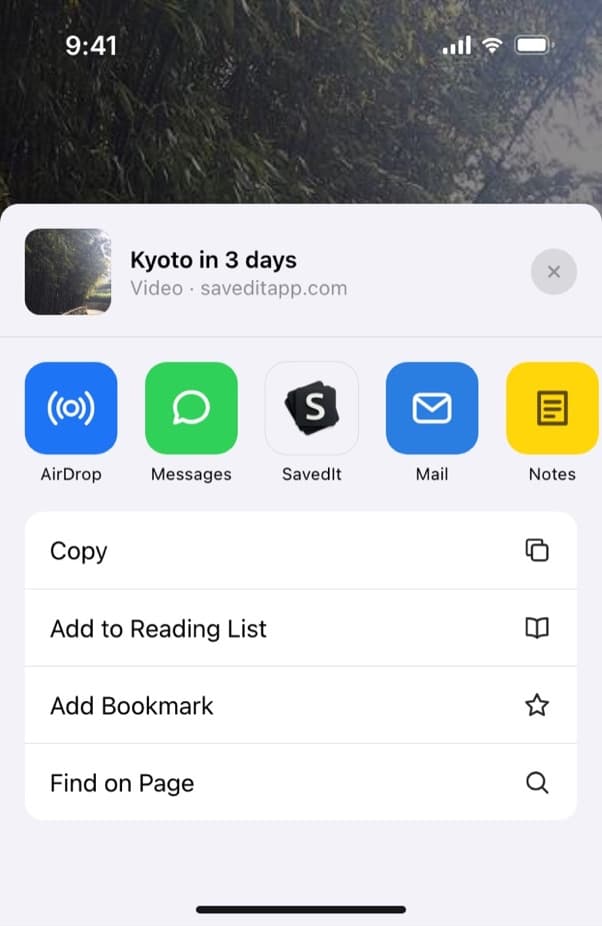
Share any Reel from Instagram to SavedIt. Add a note while it saves
Write the reason you kept it: "try this Sunday", "gift idea for Sam", "bar near the hotel". Pick a collection like Recipes or Lisbon trip if you want it filed. Both are optional.
Search by any word you remember
Type "lemon pasta" or "rooftop bar Lisbon". When the words find nothing, describe it instead, like "the pasta with the lemon and chili", and search by meaning. Word search is free. Free accounts get a number of meaning searches each month, and Plus has no limit.
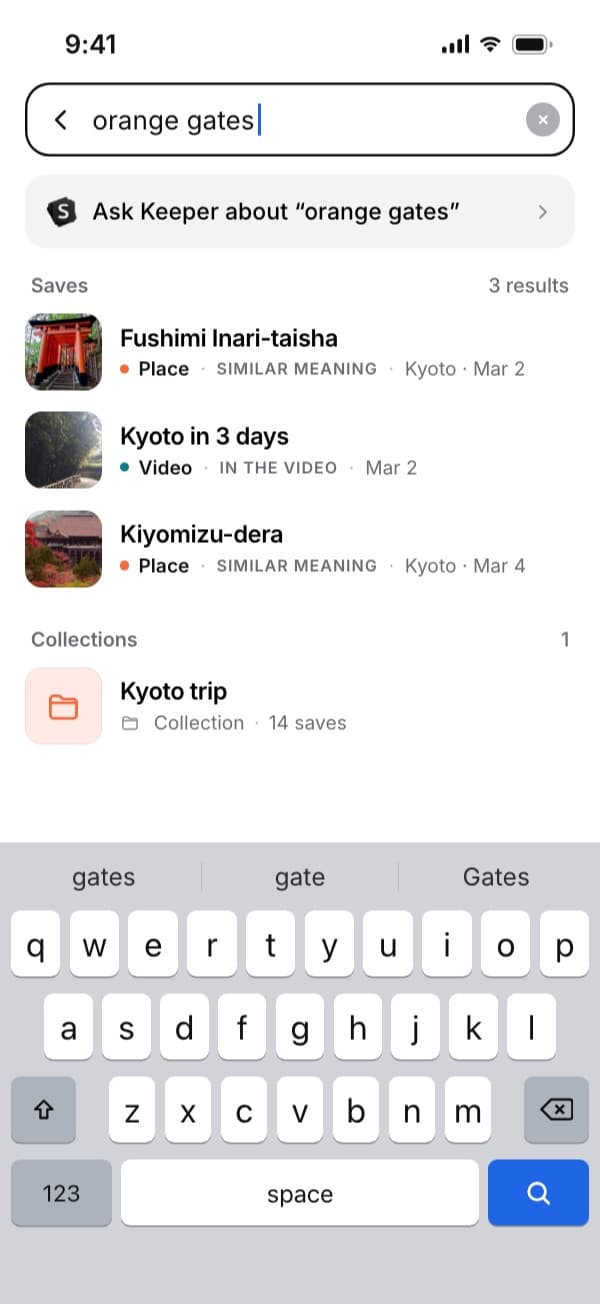
Search by what was in the Reel, not when you saw it. Open the original Reel in one tap
Every save keeps its link. Tap it and the Reel opens in Instagram, with the full video, the sound and the comments. SavedIt keeps the link and what it reads from the post, not a downloaded copy of the video.
Keep TikToks and YouTube videos next to them
The same Share, then SavedIt works in TikTok, Facebook, YouTube and your browser. A recipe Reel and a recipe TikTok land in the same library, and one search finds both.
Questions people ask
How do I delete my Instagram watch history?
Open your profile, tap the menu, then Your activity, then Watch history. Tap Select in the top right, tap the Reels you want off the list, then tap Remove.
Can other people see my Instagram watch history?
It isn't on your profile. It sits in Your activity, inside your own settings. Creators' Reel insights give counts, like views and viewers, not a list of accounts.
Does Instagram watch history show posts and photos too?
It lists Reels. For a photo or carousel you liked, open Your activity, then Interactions, then Likes, which keeps your 300 most recent likes. For anything you saved, open Saved from the same menu.
Can I search my Instagram watch history?
You can sort it, pick a date range and filter by the account that posted. If all you remember is what happened in the Reel, narrow the dates as far as you can and scroll.
Where is Watch history on Instagram?
At the bottom of Your activity. Open your profile, tap the three lines in the top right, then Your activity, and scroll down. It isn't in Saved or Archive.
What if the Reel isn't in my Watch history?
Check Likes, Saved and your chats next. Our guide to finding a Reel on Instagram goes through every place a lost Reel can be.
What's the difference between Watch history, Likes and Saved?
Watch history lists Reels you played. Likes, in Your activity under Interactions, shows posts and Reels you tapped the heart on, up to your 300 most recent. Saved holds everything you saved yourself, in the collections you made.
Can I import my Instagram watch history into SavedIt?
No. SavedIt doesn't import watch history or likes. Share a Reel to SavedIt as you watch it, or when you find it again in Watch history.
More guides
Free on iPhone and Android
Stop scrolling Watch history for one Reel
Save the good ones to SavedIt and find them by the dish, the place or a word.