

YouTube
How to organize and search YouTube Watch Later
Short answer
Tap your profile picture to open the You tab, then Watch later under Playlists. To organize it, move videos into playlists by topic and remove the ones you've watched; to search it, bring the list into SavedIt with Magic Import in Chrome.
Updated November 18, 2026 5 min read
What changed: Added how to rearrange Watch later now that Move to top is gone, and what YouTube's help no longer covers.
Organize it on YouTube
Watch later is a playlist YouTube makes for you. It works like your other playlists, so the tools are the same: save, move, reorder and remove.
Open Watch later
Tap Profile picture, then You, then Watch later.
In the app, tap your profile picture to open the You tab, then tap Watch later under Playlists (some app versions label that row Library). On a computer, open the menu on the left, click You, then Watch later.
Save a video to it
Tap More, then Save, then Change, then Watch later.
While a video plays, tap More, then Save, then Change, and pick Watch later. While you browse, tap More next to a video and choose Save to Watch later. On a computer, hover over a thumbnail and click Watch later. If there's no button, YouTube is reported to have moved it into the three-dot menu next to the title in March 2026.
Move videos into playlists by topic
Tap More, then Save, then Change, then New playlist.
A list of hundreds of videos is hard to use. Make a few playlists, like Recipes, Workouts or Trip ideas, and save each video into the one it belongs to. Then take it out of Watch later.
Remove what you've watched
Tap Watch later, then More, then Remove from Watch later.
Open Watch later, tap More next to a video, then Remove from Watch later. On a computer, click More below the video for the same option.
Rearrange it now that Move to top is gone
Tap Watch later, then Hold the two lines, then Drag.
YouTube's help now describes one way to reorder: drag. In the Android app, open Watch later, touch and hold the two lines next to a video and drag it; the help gives no separate iPhone steps. On a computer, click and hold near the thumbnail and drag. Move to top, Move to bottom and a sort menu aren't in YouTube's help, and users reported Move to top and bottom gone in 2024. A playlist of only Shorts can't be reordered.
Filter it to Videos or Shorts
Tap Videos or Shorts above the list to see one kind at a time. YouTube's help says the Shorts filter is on computers only on one page and shows it on Android on another, so look for it on both.
What Watch later does and doesn't do
- Playlists show up to 5,000 videos
- YouTube says a playlist can display at most 5,000 videos. Its help gives no separate number for Watch later.Source: YouTube Help
- Some videos can't go in
- A video set as made for kids can't be added to a playlist or saved to Watch later.Source: YouTube Help
- You filter by Videos or Shorts and reorder by hand
- YouTube's playlist help covers filtering by All, Videos or Shorts and dragging videos into a new order. It describes no search inside a playlist and no sort by date or length.Source: YouTube Help
- Extensions can sort it for you
- Browser extensions like YouTube Playlist Sorter sort Watch later by length, date, title or channel and remove watched videos in bulk. They aren't made by YouTube and change your real list, so read the reviews and keep a backup first.Source: Chrome Web Store
- Each video is a title and a thumbnail
- The list shows what the creator called the video. Why you saved it, or what it covered, isn't there unless you watch it again.
Bring your Watch later into SavedIt and search it
SavedIt is one place for everything you save, on your phone or laptop. On a laptop, Magic Import brings in your whole Watch later list for you. Then you sort it into collections and find any video by what you remember about it.
On a laptop: Magic Import brings the whole list
Tap SavedIt extension, then Magic Import, then YouTube, then Open my Watch later.
In Chrome, add the SavedIt extension and sign in. Open Magic Import, pick YouTube, then Open my Watch later. It opens your list on YouTube and scrolls through it by itself. You can stop any time and keep what it found.
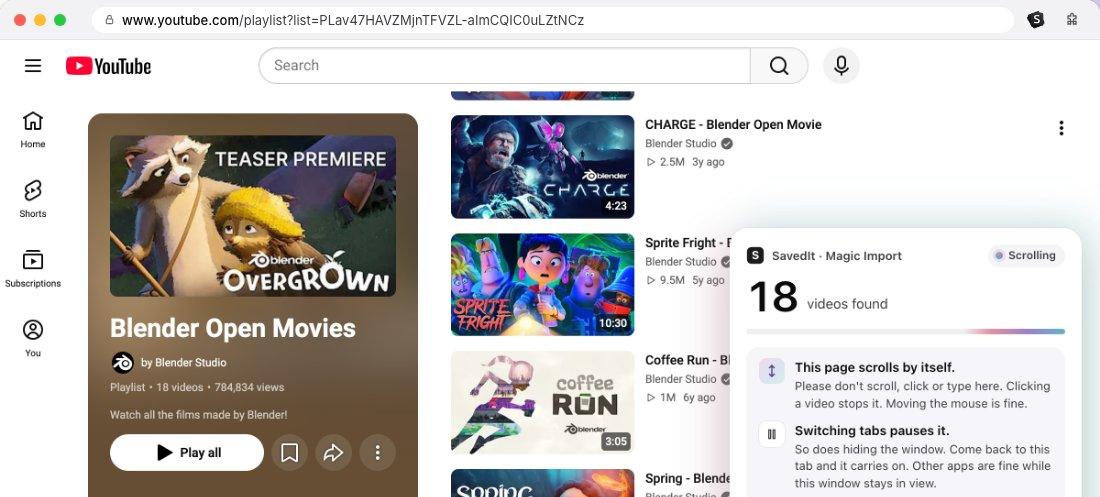
Magic Import scrolls a YouTube playlist for you. Films: Blender Studio, CC BY. Pick what comes in
The videos show up on SavedIt as a list. Untick anything you don't want, then import. Nothing is added until you do, and Magic Import reads only that list: each video's link, title and channel.
Do the same with any playlist
Open any playlist of yours on youtube.com and press Import in the extension. Your Workouts or Recipes playlist comes in the same way.
Sort them into collections
Put videos in collections like Recipes to try or Kyoto trip, with a cover and notes. A collection can hold YouTube videos next to Reels, TikToks and articles on the same topic.
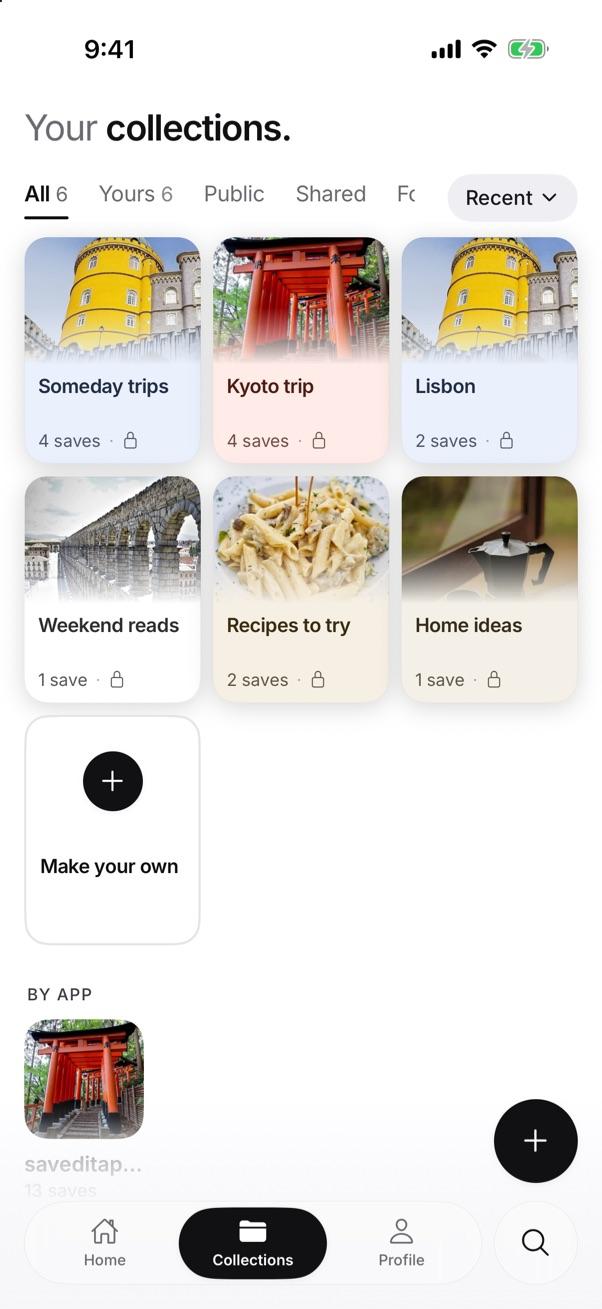
Collections in the SavedIt app. Search by what you remember
Type "that video about sleep and caffeine" or "knife skills". If the words find nothing, describe it and SavedIt finds it by meaning. Search is free and has no limit.
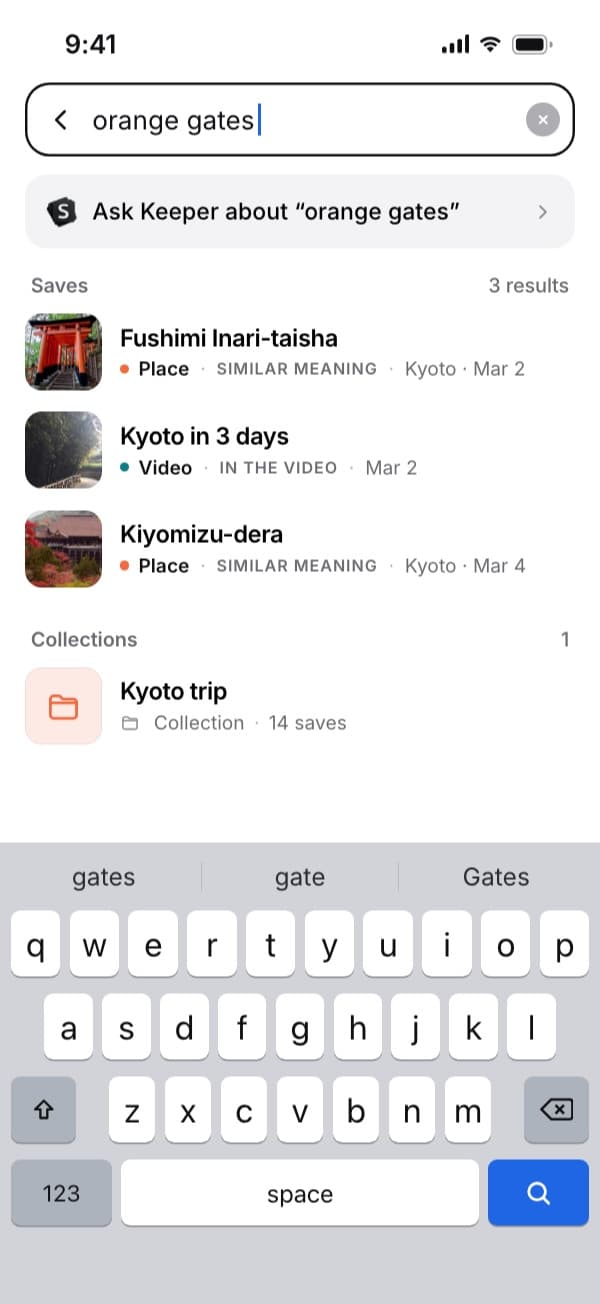
Search by what a video was about, not by scrolling. On your phone: share one video at a time
Tap Share, then SavedIt.
Under a video in the YouTube app, tap Share, then SavedIt. It lands in the same library you see on your laptop. Every save keeps its link, so one tap opens the video on YouTube.
Questions people ask
Where is Watch later on YouTube?
Tap your profile picture to open the You tab, then Watch later under Playlists. On a computer, open the menu, click You, then Watch later.
How many videos can Watch later hold?
YouTube's help says a playlist can display at most 5,000 videos. It doesn't give a separate number for Watch later.
Can I search my Watch later list on YouTube?
YouTube's help doesn't describe a search inside a playlist. You can filter it to Videos (and to Shorts on a computer) and reorder by hand. To search it by what a video was about, bring the list into SavedIt.
How do I clear my Watch later?
Open Watch later, tap More next to a video, then Remove from Watch later. YouTube's help describes only this one-at-a-time way; clearing watched videos in bulk takes a browser extension.
How do I rearrange Watch later now?
Drag. In the Android app, hold the two lines next to a video and move it; on a computer, click and hold near the thumbnail. YouTube's help no longer mentions Move to top, Move to bottom or a sort menu.
Can SavedIt import my Watch later list?
Yes, on a laptop. In Chrome, the SavedIt extension's Magic Import opens your Watch later and brings the videos in after you review them. On a phone, share videos to SavedIt one at a time.
Does Magic Import change anything on YouTube?
No. It reads the list on your screen: each video's link, title and channel. Your Watch later stays as it is, and nothing is added to SavedIt until you review the list and import.
Does Magic Import need my YouTube password?
No. It works in your own signed-in Chrome tab and reads only what the playlist page shows. It never sees your password.
More guides
- Where are saved videos on YouTube? Watch later and playlists
- How to see your YouTube watch history and find a video you watched
- How to export your TikTok favorites
- Save Instagram, TikTok, YouTube, Reddit and X posts in one place
Free on iPhone and Android
Turn Watch later into a list you can use
SavedIt keeps your videos in collections and finds them by what you remember. Free on your phone or laptop.