

YouTube
How to see your YouTube watch history and find a video you watched
Short answer
In the YouTube app, tap your profile photo, then Settings and Manage all history. Tap the search icon to look for a video, or the calendar to pick the day you watched it.
Updated November 6, 2026 5 min read
Find a video you watched on YouTube
The You tab shows what you watched recently: tap your profile picture in the app, or click You on youtube.com and look under History. The full list, with search and dates, is in the app's Settings under Manage all history, and in My Activity on a computer.
Open Manage all history
Tap Profile photo, then Settings, then Manage all history.
Sign in to the YouTube app and tap your profile photo at the bottom. Tap Settings, then Manage all history.
Search it or pick a date
Tap Manage all history, then Search.
Tap the search icon and type what you remember from the title or the channel. Or tap the calendar to see only the days around when you watched it. Tap a video to play it again.
On a computer
Tap My Activity, then YouTube History, then Manage history.
At youtube.com, click You in the guide, then History, for what you watched recently. For the full list, go to myactivity.google.com and sign in. Click YouTube History, then Manage history, and click the search icon to search it.
Delete one video or many
Tap Manage all history, then Delete.
Tap the X next to a video to delete just that one. To delete more at once, tap DELETE and choose the time frame. DELETE also removes your YouTube searches from that time frame.
Pause it
Tap Manage all history, then Controls.
Open the Controls tab and untick Include the YouTube videos you watch. On a computer, it's My Activity, Controls, Turn off. Videos you watch while it's paused never show up in your history.
Let it delete itself
Tap YouTube History, then Manage history, then Auto-delete.
In My Activity, open YouTube History, then Manage history, and click Auto-delete. Pick 3, 18 or 36 months, or Don't auto-delete activity, then click Next and Confirm. The same setting covers your YouTube searches.
Signed out, or on a TV
Tap Settings, then History & privacy.
Signed out in the app, tap the profile picture, then Settings and History & privacy to clear or pause watch history. Signed out at youtube.com, select History. On a TV or game console, go to Settings in the menu on the left, then Pause watch history or Clear watch history.
What else to know about YouTube watch history
- Paused means nothing was kept
- Videos you watch while history is paused don't show up in your history, and turning it back on doesn't bring them back.Source: YouTube Help
- A paused history can blank your Home page
- YouTube removes Home recommendations when you have no relevant recent history and don't want recommendations based on it. In April 2026, people who had kept history paused for years reported a blank Home page with a notice that watch history is paused.Source: PiunikaWeb
- DELETE takes your searches too
- Deleting a time frame with DELETE also removes your YouTube search history from that time frame. Use the X next to a single video to keep your searches.Source: YouTube Help
- Incognito isn't linked to your account
- Incognito in the YouTube mobile app isn't linked to your account, and your searches aren't saved. It ends after 90 minutes of no use.Source: YouTube Help
- New accounts delete after 36 months
- Since June 2020, new accounts and people turning on YouTube History for the first time get auto-delete at 36 months by default. Check Auto-delete to see what yours is set to.Source: Google
- Your searches are kept in the same history
- Your YouTube searches are saved in YouTube History along with what you watch. To stop saving them, open Manage all history, then Controls, and untick Include your searches on YouTube.Source: YouTube Help
- Liked videos are a separate playlist
- Liking a video adds it to Liked videos, a private playlist. In the app, tap your profile picture, then Playlists and Liked videos. On a computer, it's in the menu on the left. It shows at most 5,000 videos.Source: YouTube Help
Save the video once you find it
Watch history only helps if it was on when you watched, and you still need the title, the channel or the day. Once you find the video, send it to SavedIt. Next time you search for what you remember from it.
Found it? Share it to SavedIt
Tap Share, then SavedIt.
Play it from your history, tap Share under the video, then SavedIt in your phone's share menu. YouTube stays open while it saves. Add a note in your own words, like "the bike chain fix on the balcony". Or copy the link, open SavedIt, tap +, then Save a link and paste it.
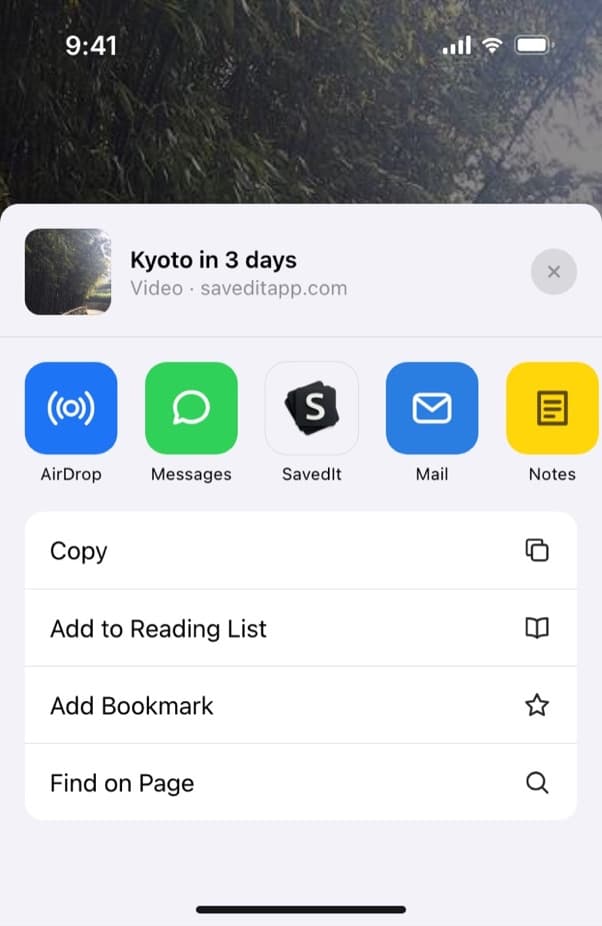
Share a YouTube video to SavedIt. Search for what was said in it
When the video has captions, SavedIt reads what's said in it, so a word from the video finds it even if the title says something else. Reading a video is 10 a month on Free and 500 a month on Plus. If the words find nothing, tap Search by meaning and describe it, like "the talk about growing tomatoes in pots".
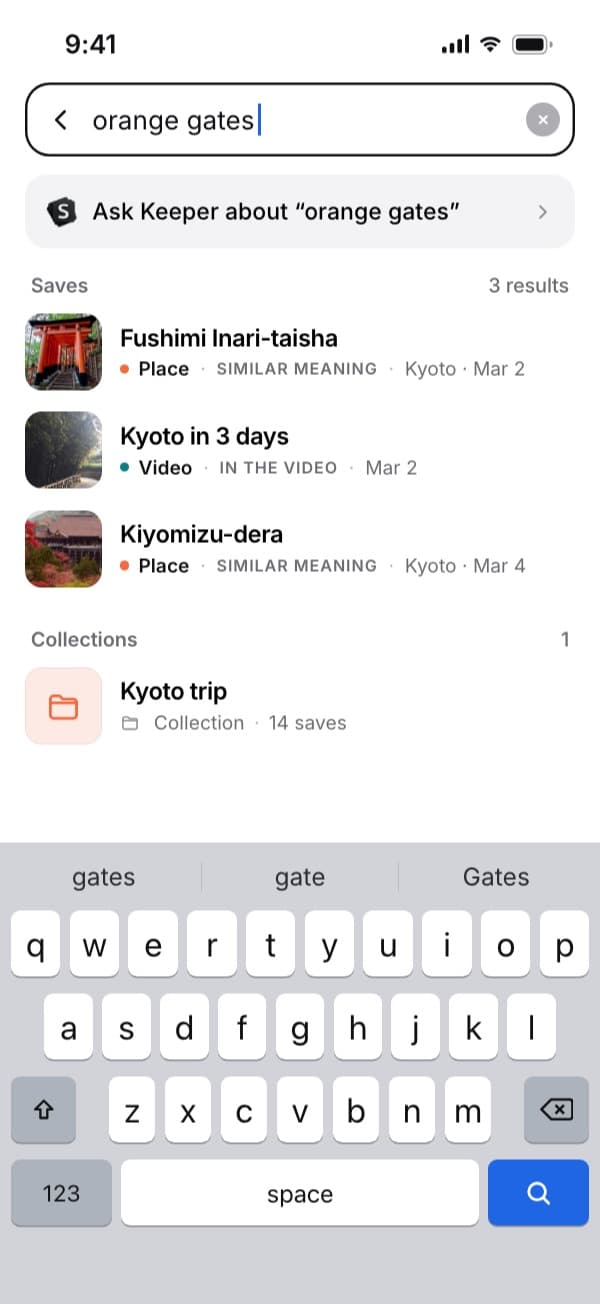
Two words you kept, "orange gates", bring back the Kyoto video. Open the original in YouTube
Tap the save to watch it in YouTube again. SavedIt stores the link, your note and what it read, not the video file. If the video is taken down it won't play, but your note is still there.
Questions people ask
How do I see my YouTube watch history?
In the app, tap your profile photo, then Settings and Manage all history. On a computer, click You, then History at youtube.com, or go to myactivity.google.com, then YouTube History and Manage history.
How do I find a YouTube video I watched?
Open Manage all history and tap the search icon, then type a word from the title or the channel. Or tap the calendar and look at the day you watched it.
Can I see my YouTube watch history by date?
Yes. In Manage all history, tap the calendar and pick a date range.
Why is my YouTube watch history empty or missing videos?
History was paused, you watched signed out or in Incognito, you're signed in to a different account, or the videos were deleted or auto-deleted. To turn it back on, open Manage all history, then Controls, and tick Include the YouTube videos you watch. Videos watched while it was paused don't come back.
Why is my YouTube Home page blank?
Usually because watch history is paused. YouTube removes Home recommendations when it has no relevant recent history to go on. Turn history back on and watch a few videos.
How do I clear my YouTube watch history?
Open Manage all history and tap the X next to a video, or DELETE for a whole time frame. DELETE also removes your searches from that time frame. On a TV, go to Settings, then Clear watch history.
Where are the videos I liked on YouTube?
In the Liked videos playlist. In the app, tap your profile picture, then Playlists and Liked videos. It shows up to 5,000 videos.
Can I import my YouTube watch history into SavedIt?
No. SavedIt can't bring in your YouTube watch history, so share the videos you want to keep, one at a time.
More guides
Free on iPhone and Android
Find a saved video by a word you kept
Type a word from your note or the title, and SavedIt brings back the save with its YouTube link.