Comparison
Best bookmark manager apps in 2026, honestly compared
Short answer
Raindrop.io is the best all-round bookmark manager for web links, Anybox if you only use Apple devices, and Pinboard if you want a plain paid site with no ads or trackers. Pick SavedIt if your links come from your phone as well, out of Instagram, TikTok and YouTube, and you want to find them by what you remember.
Updated October 27, 2026 5 min read
How to pick
Four questions settle it.
Where do your links come from?
Only a browser on your laptop? Built-in bookmarks plus Raindrop or Pinboard cover it. From your phone, out of Instagram, TikTok and YouTube? You need an app that sits in the share sheet.
What will you remember when you search?
If it's the title, every option here works. If it's a word inside the page, you need full-text search: Raindrop Pro and Pinboard's archiving add-on have it. If it's only the idea, SavedIt searches by meaning from a description.
Which devices do you use?
Anybox is for Mac, iPhone and iPad. Pinboard is a website you bookmark into from any browser. Raindrop and mymind run on phones and computers. SavedIt runs on iPhone, Android and the web, with Chrome and Firefox extensions.
Free or paid?
Raindrop's free plan has no cap on bookmarks. Anybox is free up to 50 links and mymind up to 100 cards. Pinboard charges a yearly fee. SavedIt's saving and keyword search are free.
What each one costs and covers
- Raindrop: free, search is Pro
- The free plan has unlimited bookmarks, collections and devices. Full-text search, saved copies of pages and the broken-link checker are Pro.Source: Raindrop Pro features
- Anybox: 50 links free
- Anybox runs on Mac, iPhone and iPad. The free version holds 50 links in total. Pro removes the cap.Source: Anybox
- Pinboard: a yearly fee
- Pinboard has run since 2009 with no ads and no trackers. The archiving add-on saves a copy of each bookmark, adds full-text search and checks for dead links.Source: Pinboard
- mymind: 100 cards free
- New accounts start on a free guest plan of 100 cards. Past that, the paid plans run from The Bookmarker, for bookmarks with no AI features, to Student of Life and Mastermind.Source: mymind Help
- Browser search finds names
- Chrome and Safari search a bookmark's name, and Chrome its address too. Neither reads the page you saved.Source: Apple Support
The apps, side by side
Swipe sideways to see every column.
| App | Best for | Where it shines | Where it falls short |
|---|---|---|---|
| Chrome and Safari bookmarks | Sites you open every week, on one browser. | Free, built in, and synced through your Google Account or iCloud. Folders on every device, and Safari bookmarks can carry a description on the Mac. | Search covers names, plus addresses in Chrome. No tags. Each browser keeps its own set, and links you saved inside phone apps aren't there. |
| Raindrop.io | Web links, articles and PDFs you want to keep for years. | Apps for iPhone, iPad, Android, Mac and Windows, extensions for Chrome, Firefox, Safari and Edge, and a free plan with unlimited bookmarks. Pro adds full-text search, saved copies of pages and an assistant you can ask about your bookmarks. | Search inside pages and saved copies need Pro. Sorting is yours to do with collections and tags. |
| mymind | A private, visual library you never want to file. | Smart Spaces sort saves for you, and paid plans tag your images and read the text in them. You search by color, keyword, brand or date. iPhone, Android, Mac and browser extensions. | The free guest plan stops at 100 cards. The cheapest paid plan, The Bookmarker, has no AI features, so image tagging and Smart Spaces start on Student of Life. |
| Anybox | Bookmarks on Mac, iPhone and iPad, kept fast and local. | Fast offline search, nested tags and folders, Smart Lists that sort by address or date added, and a share extension on Mac and iPhone. | Apple devices only. The free version stops at 50 links. |
| Pinboard | Plain, fast bookmarking from any browser, for people who'd rather pay than be tracked. | Independent since 2009, no ads, no trackers. The archiving add-on keeps a copy of every page with full-text search and dead-link checks. | Paid every year, archiving costs extra, and it's a website rather than a phone app. |
| SavedIt | Links from your browser and your phone apps, found by what you remember. | Share from Instagram, TikTok, YouTube, Safari or Chrome on iPhone or Android, or save the tab you're on with the Chrome or Firefox extension. Imports Chrome, Safari, Firefox and Edge bookmarks and Raindrop and Readwise exports. Search by any word or by meaning. Collections you can share. | It keeps the link, what it read from the page and your notes, not a permanent copy, so a page that's taken down may stop opening. Free covers saving, searching your own words and 20 searches by meaning a month. Plus is US$7.99 a month or US$39.99 a year, with 14 days free, and makes search by meaning unlimited. |
When SavedIt is the right pick
SavedIt is for people whose links come from their phone as often as their browser: a Reel, a TikTok, a YouTube video and a news article, all in one search.
Move your browser bookmarks in
Tap +, then Import saves, then Chrome, Safari, Firefox or Edge, then Choose export file.
Pick your browser under From and SavedIt shows how to export. Choose the file, check the plan, then tap Import. You can undo or resume it from Import history.
Search by meaning when the words don't match
Keyword matches come first, from titles, notes, tags and highlights. No match on the words? One tap searches by meaning from a description.
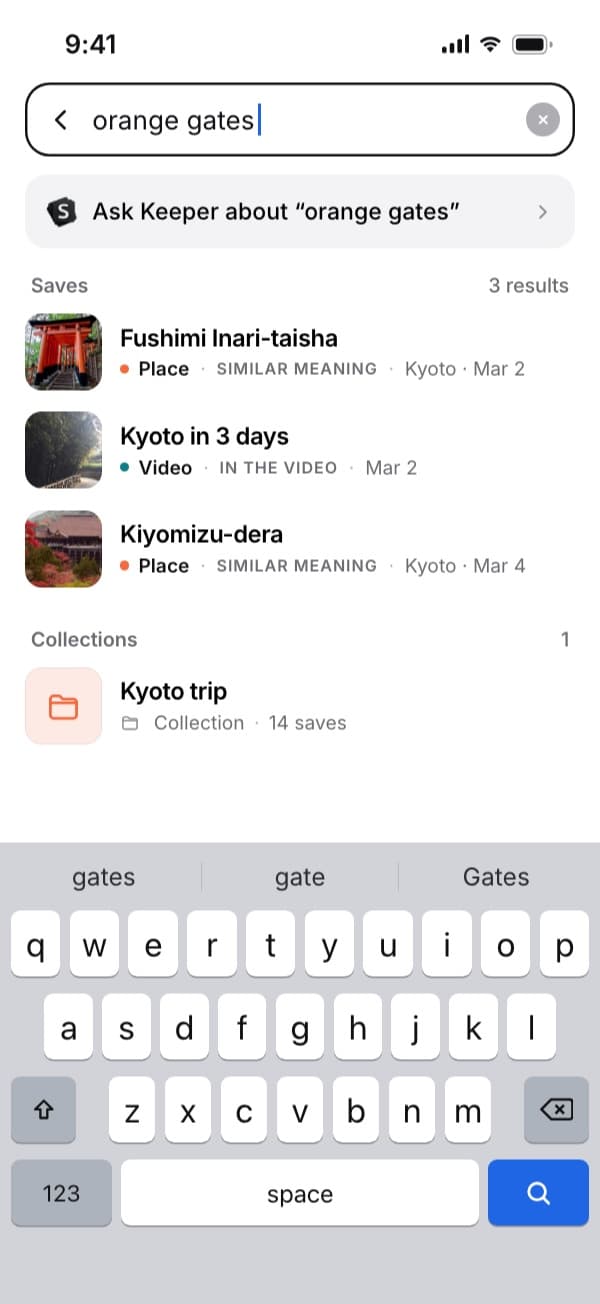
Here "orange gates" finds the Kyoto video by what's said in it. Plus searches by meaning without a monthly limit. Group links into collections
Make a collection for a trip or a project. One save can sit in several collections, and you can invite people to view or edit.
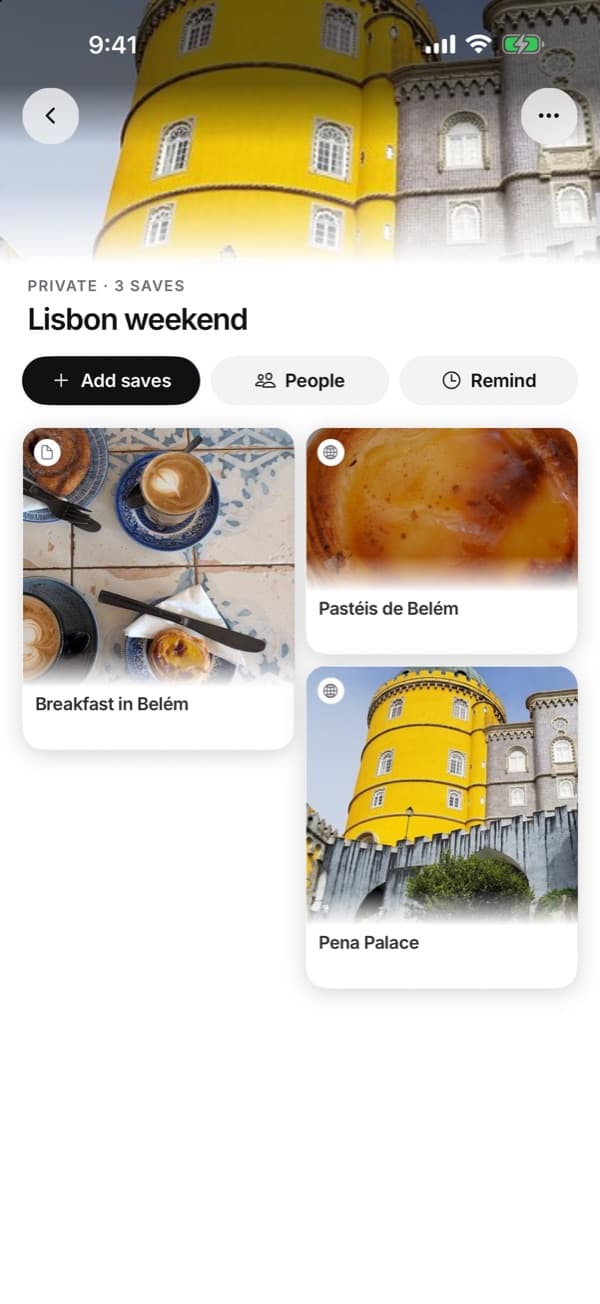
A private collection with three saves. People invites others in.
Questions people ask
What is the best free bookmark manager?
Raindrop.io. Its free plan has unlimited bookmarks and collections on every device. Your browser's own bookmarks are free too, but they only search by name.
Is there an AI bookmark manager?
mymind's paid plans tag your images and sort saves into Smart Spaces for you. Raindrop Pro has an assistant you can ask about your bookmarks. SavedIt searches by meaning, so a description finds the link when the words don't match.
Can I bring my Chrome or Safari bookmarks into SavedIt?
Yes. Export them from the browser, then in SavedIt tap +, Import saves, pick the browser and choose the file.
Is Pinboard still around?
Yes. It's a paid bookmarking site with a yearly fee and an optional archiving add-on for full-text search.
More guides
Free on iPhone and Android
Browser bookmarks and phone saves, one search
Bring in your bookmarks, then share links from any app on your phone.