Chrome
Chrome bookmark manager: where it is and how to search it
Short answer
Open the Chrome menu (the three dots), then Bookmarks and lists, then Bookmark Manager, or press Ctrl+Shift+O (Cmd+Option+B on a Mac). The search box at the top finds bookmarks by their name and web address.
Updated October 27, 2026 3 min read
Find and sort them in Chrome
Open Bookmark Manager
Tap More, then Bookmarks and lists, then Bookmark Manager.
More is the three dots at the top right. From the keyboard: Ctrl+Shift+O on Windows and Linux, Cmd+Option+B on a Mac. Typing chrome://bookmarks in the address bar opens the same page.
Search without opening it
Tap Address bar, then @bookmarks, then Tab.
Type @bookmarks in the address bar, press Tab or Space, then a word from the bookmark's name. Inside Bookmark Manager, the search box at the top does the same.
Make folders and put them in order
Tap More, then Add new folder.
Use the three dots at the top right of Bookmark Manager, not the browser's. Drag bookmarks into the folders on the left. Sort by name, in the same menu, puts a folder A to Z.
On your phone
Tap More, then Bookmarks.
On Android, the Search your bookmarks bar sits at the top of the list, and Sort and view options sorts by newest, oldest, last opened or name. On iPhone, tap More, then Bookmarks, then a folder.
Get the same bookmarks everywhere
Sign in to Chrome with your Google Account on each computer and phone, and your bookmarks follow you.
What Chrome's bookmark manager can't do
- Search reads names and addresses
- Chrome matches your words against the bookmark's name and URL. A word that was only in the article itself finds nothing.Source: Chrome for Developers
- Nowhere to write why
- A bookmark is a name, a web address and a folder. There's no note field, so in a year you won't know why you kept it.
- A delete is final
- Google's help says a deleted bookmark can't be recovered. Export a copy before a big clean-up.Source: Chrome Help
- Export is one HTML file
- Bookmark Manager, three dots, Export bookmarks saves everything to a single HTML file. That file is how you move bookmarks into any other app.Source: Chrome Help
Search your Chrome bookmarks by what you remember
Export once from Chrome, import the file into SavedIt, and your bookmarks sit next to everything you save on your phone, searchable by any word or by meaning.
Export from Chrome
Tap More, then Bookmarks and lists, then Bookmark Manager, then More, then Export bookmarks.
Chrome saves an HTML file. Get it onto your phone with AirDrop, email or a cloud drive.
Import it into SavedIt
Tap +, then Import saves, then Chrome, then Choose export file.
Tap Chrome under From and SavedIt shows the same export steps. Choose the file, check the plan, then tap Import. Changed your mind? Undo it from Import history.
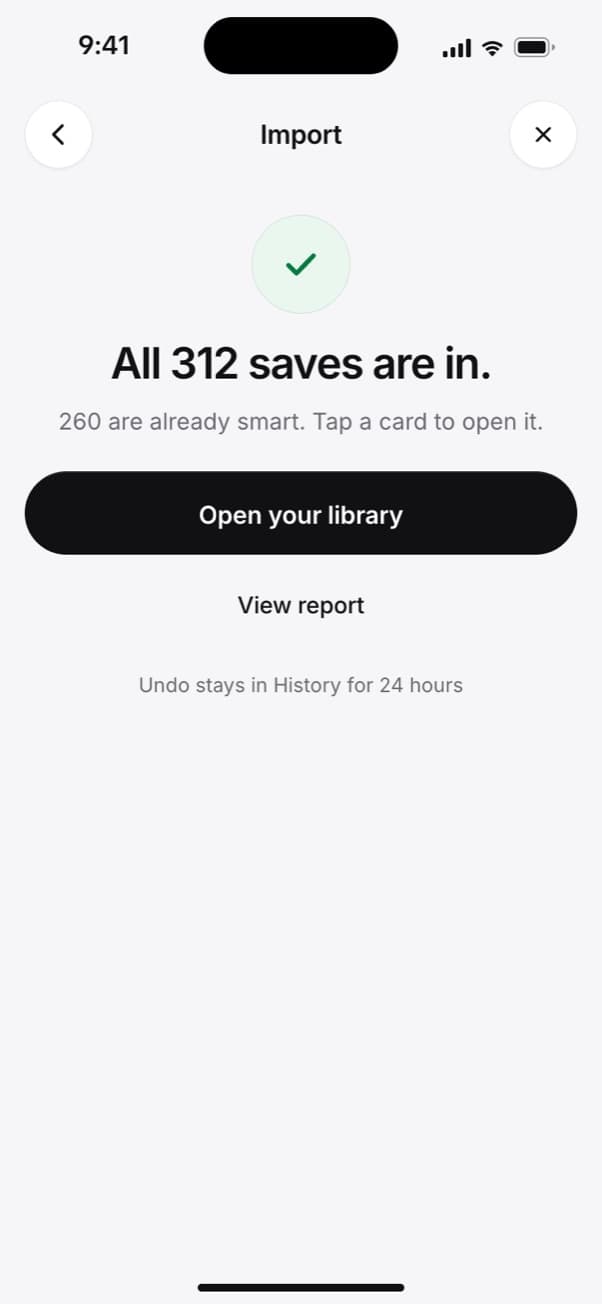
Every bookmark lands in your library. Undo stays in History for 24 hours. Search by any word, or by meaning
Type a word from the title, or a note or tag you added later. No match on the words? One tap searches by meaning, so "the article about standing desks" still finds it.
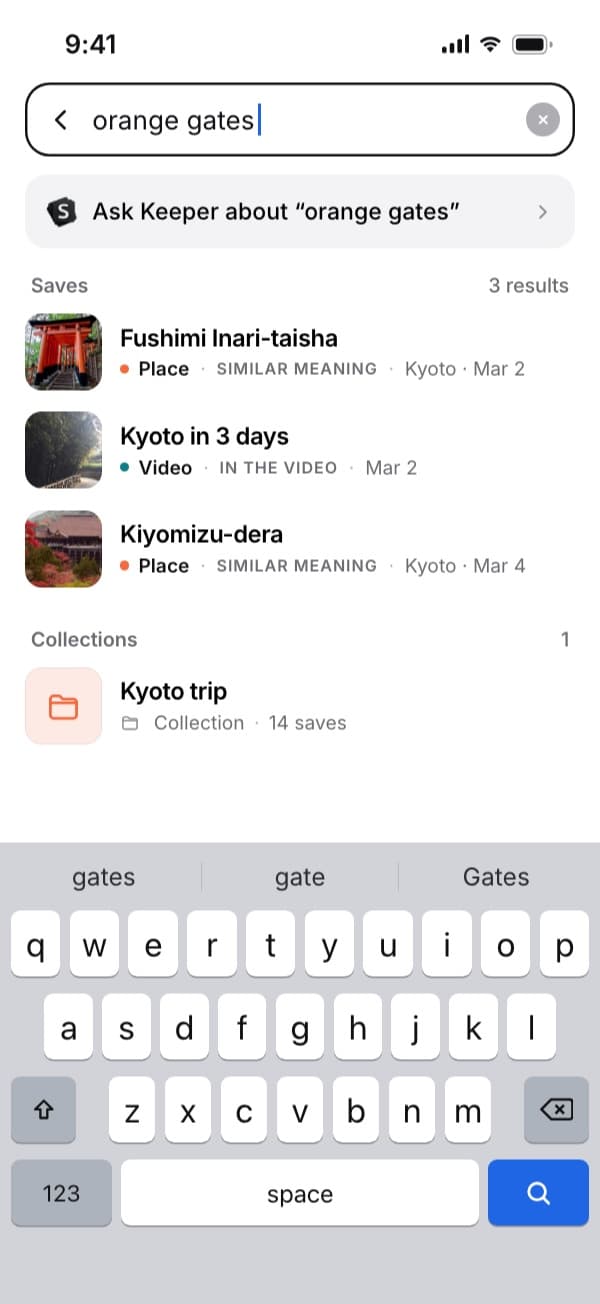
Here "orange gates" finds the Kyoto video by what's said in it. Plus searches by meaning without a monthly limit. Keep adding from your phone
Tap Share, then SavedIt.
New links come in from the share sheet on iPhone or Android, so laptop bookmarks and phone saves end up in one list. On the computer, the SavedIt Chrome extension saves the page you're on.
Questions people ask
Where is the bookmark manager in Chrome?
Click the three dots at the top right, then Bookmarks and lists, then Bookmark Manager. The shortcut is Ctrl+Shift+O, or Cmd+Option+B on a Mac.
How do I search my Chrome bookmarks?
Use the search box at the top of Bookmark Manager, or type @bookmarks in the address bar, press Tab, and type a word from the name.
Can I recover deleted Chrome bookmarks?
Google's help says no. Export your bookmarks to an HTML file now and then so you always have a copy.
Do Chrome bookmarks sync to my phone?
Yes, when you're signed in to Chrome with the same Google Account on both. They show under More, then Bookmarks.
What's a good bookmark organizer for Chrome?
Raindrop.io has a Chrome extension and a free plan with unlimited bookmarks. SavedIt takes your Chrome export and everything you share from your phone, and searches it all by any word or by meaning.
More guides
Free on iPhone and Android
Laptop bookmarks and phone saves together
One library for the links in Chrome and the posts on your phone.