Chrome
Chrome Reading list: how to save pages to read later
Short answer
On a computer, right-click the tab and choose Add tab to reading list, then open it from More, Bookmarks and lists, Reading list. On iPhone, tap More, then Add to Reading List; on Android, tap More, then the star, and pick the Reading list folder.
Updated October 27, 2026 3 min read
Save and read in Chrome
Add a page on a computer
Tap Right-click the tab, then Add tab to reading list.
Or use the menu: More, Bookmarks and lists, Reading list, Add tab to reading list.
Open your Reading list
Tap More, then Bookmarks and lists, then Reading list, then Show reading list.
It opens in the side panel, where you can reorder, edit and delete entries.
On iPhone
Tap More, then Add to Reading List.
From another app, tap Share, then Chrome, then Read later. To read, tap More, then Reading List. Swipe left on an entry and tap Delete to clear it.
On Android
Tap More, then Star, then Folder, then Reading list.
Chrome saves each new page to the last folder you used, so pick Reading list once and the star keeps saving there. To read, tap More, then Bookmarks, then Reading list.
Download it if you'll be offline
Tap More, then Download.
That's the Android path. On a computer it's More, Cast, save, and share, then Save page as. Do it while you still have a connection.
What Chrome's Reading list can't do
- An entry is a title and a link
- Chrome stores the title, the address, when you added it and whether you've read it. No folders, no tags, no notes.Source: Chrome for Developers
- Offline means downloading
- Google's help says to download pages ahead of time to read them offline, and saving needs a connection.Source: Chrome Help
- On Android it's a bookmarks folder
- The star saves to whichever folder you used last, so a page meant for later can land in your bookmarks instead.Source: Chrome Help
- It only holds web pages
- A Reel you meant to watch or a TikTok recipe for the weekend has to live somewhere else.
Read later from Chrome, and find it again
Share a page from Chrome on your phone to SavedIt and it sits with everything else you saved. Reader gives you a clean copy to read.
Share from Chrome on your phone
Tap Share, then SavedIt.
On iPhone, Share is in Chrome's address bar. On Android, open More and tap Share. You stay on the page, and you can add a note while it saves.
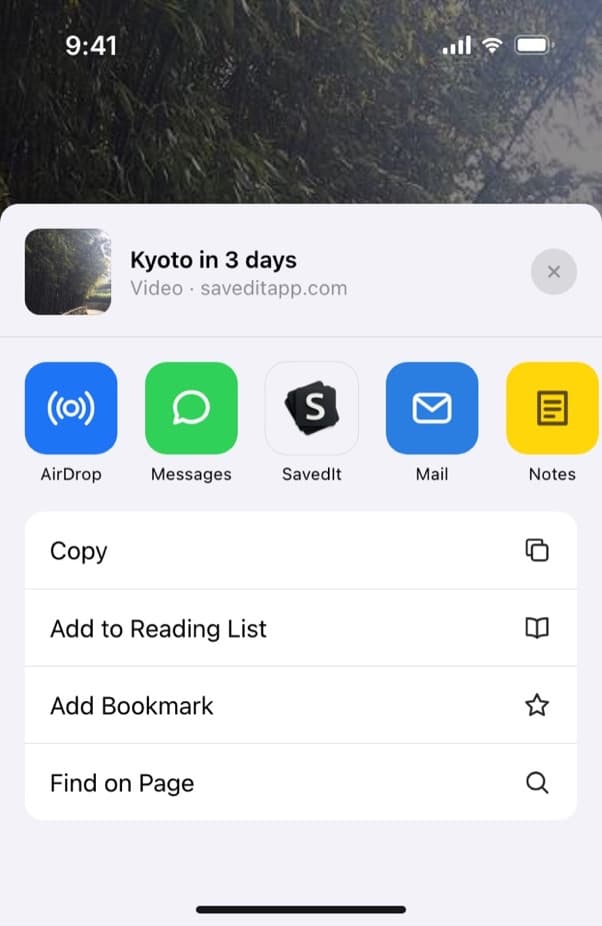
Pick SavedIt in the row of apps. Read it in Reader
Tap Open the save, then Read.
Tap Read, next to the blue open button. Reader shows a clean reading copy of the article or PDF, free, and the lines you highlight become searchable.
Bring your Chrome bookmarks too
Tap +, then Import saves, then Chrome, then Choose export file.
Export from Chrome's Bookmark Manager (three dots, Export bookmarks), then choose the file in SavedIt, check the plan and tap Import.
Find it by what it was about
Search a word from the title, your note or a highlight. Only remember the gist? One tap searches by meaning, so "that piece on four-day weeks" still finds it.
Questions people ask
Where is the Reading list in Chrome?
On a computer: More, Bookmarks and lists, Reading list, Show reading list, and it opens in the side panel. On iPhone: More, then Reading List. On Android: More, Bookmarks, Reading list.
Does Chrome's Reading list work offline?
Google's help says to download a page ahead of time if you want it offline. On Android that's More, then Download.
How do I delete something from Chrome's Reading list?
On a computer, delete it in the side panel. On iPhone, swipe left on the entry and tap Delete.
Is Chrome's Reading list the same as bookmarks?
On Android it's a folder inside Bookmarks. On a computer and on iPhone it has its own place in the menu. Either way an entry keeps only a title, a link and whether you've read it.
More guides
Free on iPhone and Android
One list for pages, Reels and TikToks
Save from Chrome and every other app on your phone, then search it all.