

How to see liked posts on Facebook
Short answer
In the Facebook app, tap Menu (then your name on iPhone), Options, then Activity Log, and open Your activity across Facebook to see your likes. On a computer, go to your profile picture, Settings & privacy, Activity Log.
Updated November 2, 2026 5 min read
Find them in Facebook
The Activity log is the full record of what you've done on Facebook, likes included. The way in differs a little between the app and a computer.
Open the Activity log in the app
Tap Menu, then Options, then Activity Log.
On iPhone, tap Menu, then your name. On Android, tap Menu. Then tap Options under your profile picture and pick Activity Log.
Or open it on a computer
Tap Profile picture, then Settings & privacy, then Activity Log.
Click your profile picture in the top right, then Settings & privacy, then Activity Log. Click Activity history on the left to see the categories.
Go to your likes
Tap Activity Log, then Your activity across Facebook.
Your activity across Facebook holds the posts you created, your likes and your other interactions. On a computer, click Activity history first, then pick it under Activity Type.
Jump to a date
Tap Filters, then Date.
In the app, tap Filters at the top, then Date, set a start and end date and tap Done. On a computer, click Date, pick a year and then a month, and click Save Changes.
Unlike or change a reaction
Tap Open the post, then Like.
Tap Like again on the post to take the like back. For a heart or another reaction, tap your reaction to remove it, or tap and hold it to switch to a different one.
Liked a Reel? Check your Liked tab
Tap Menu, then Reels, then Liked.
On iPhone, tap Menu, then your name. On Android, tap Menu. Then tap Reels, above Details, and tap Liked. It shows Reels and videos you gave a plain like. A heart or a laugh only shows up in the Activity log.
What to know about Facebook likes
- Only category and date filters
- You narrow the log by category and by date. To find a liked post about a sofa or a recipe, you need to remember roughly when you liked it, then scroll that stretch.Source: Facebook Help
- The Liked tab misses reactions
- Reels you loved, laughed at or later unliked don't appear under Liked. Only the Activity log shows every reaction.Source: Facebook Help
- Private log, visible reactions
- Only you can see your Activity log. Your reaction on someone else's post is a different matter: people who can see that post can tap its reactions and see your name. Hiding reaction counts in Reaction preferences hides the number, not the names.Source: Facebook Help
- A like isn't a bookmark
- A like has no note, no folder and no reason attached. Months later it's one line among hundreds of likes on birthday photos and memes.
Save the posts you want to find again
Likes are a record of what you reacted to. Some posts you'll want again, like a recipe, a couch for sale or a trip idea. Share those to SavedIt. It keeps the link and what it reads from the post, and finds it from any word you remember.
Share the post to SavedIt
Tap Share, then SavedIt.
Tap Share under a Facebook post, Reel or video, open your phone's share menu from there, then pick SavedIt. It works on iPhone and Android, and you stay in Facebook while it saves. Already copied the link? In SavedIt, tap +, then Save a link, and paste it.
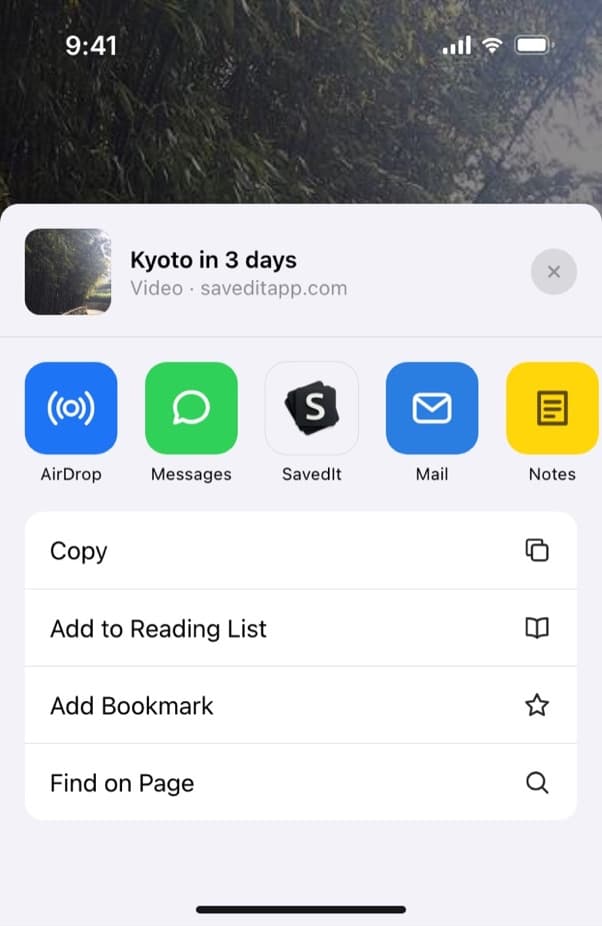
Pick SavedIt in the share sheet. You stay in Facebook. Add a note and a collection
Before it saves, write why you kept it ("ask about delivery") and drop it into a collection like Recipes or New apartment.
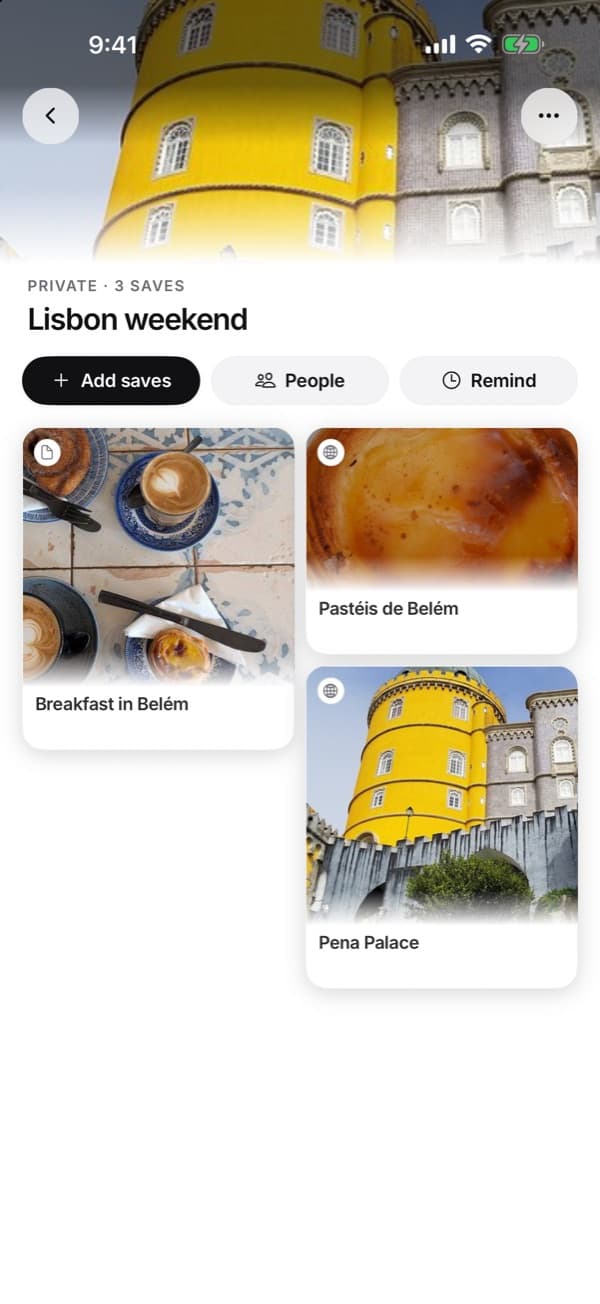
A collection groups saves from Facebook, Instagram, TikTok and anywhere else. Search the way you remember it
Type any word you remember, like "lasagna" or "standing desk". If the words find nothing, describe it instead and SavedIt searches by meaning. Word search is free. Search by meaning has a monthly limit on Free and no limit on Plus.
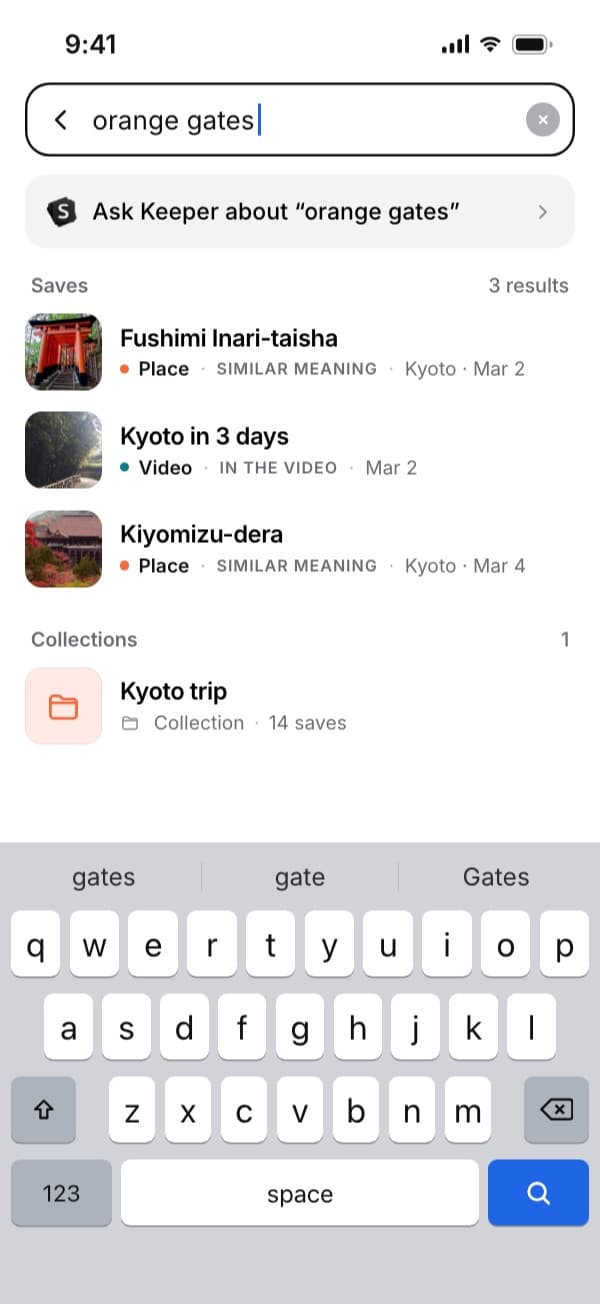
Search "orange gates" and the Kyoto saves come up. Open the original any time
Every save keeps its link, so one tap opens the post on Facebook with its comments. SavedIt doesn't download a copy, so if the post is deleted, you keep your note and what SavedIt read from it, but not the post itself.
Questions people ask
How do I see posts I liked on Facebook?
In the app, tap Menu (then your name on iPhone), Options, then Activity Log, and open Your activity across Facebook. On a computer it's under your profile picture, Settings & privacy, Activity Log, then Activity history.
Can I search my liked posts on Facebook?
The Activity log lets you narrow by category and by date, so you need to remember roughly when you liked a post. To find a post later by a word you remember, share it to SavedIt when you like it.
Can other people see what I've liked on Facebook?
Not as a list of posts. Your Activity log and your Liked Reels are private. But anyone who can see a post you reacted to can open its reactions and see your name. Pages you follow have a separate setting: Who can see the people and Pages you follow, under Settings, Followers and public content.
Can I hide my likes on Facebook?
You can hide the number of reactions, not the names. In Settings, Reaction preferences turns off the counts on your posts or on other people's posts. Facebook says it doesn't hide who reacted.
How do I unlike a post on Facebook?
Open the post and tap Like again. For a heart or another reaction, tap your reaction to remove it, or tap and hold it (hover on a computer) to pick a different one.
Why isn't a Reel I liked in my Liked tab?
The Liked tab only shows plain likes. If you reacted with something else, or unliked it later, it won't be there. Your Activity log still lists every reaction.
How do I find a post I liked a long time ago?
Use the date filter. In the app, tap Filters, then Date, and set a start and end date around when you think you liked it. On a computer, pick the year and month. Then scroll that stretch of the log.
Can I clear my Activity log?
Partly. Manage Activity, in the iPhone, Android and Facebook Lite apps, moves your own posts, photos and videos to Archive or Trash, and Trash empties after 30 days. Not everything in the log can be moved. To take back a like, unlike the post itself.
Can I download a list of my Facebook activity?
Yes. In Settings, open Meta Account, then Your information and permissions, then Export your information. Pick the info and date range you want, in HTML or JSON. The file stays available for 4 days.
Is liking a post the same as saving it?
No. Saved is a separate private list, at facebook.com/saved on a computer. Our guide to Facebook saved posts covers it. To search what you keep by any word, share it to SavedIt as well.
Can SavedIt import my Facebook likes?
No. SavedIt doesn't import Facebook likes. Share the posts you want to keep from the Share button, one at a time, and they're searchable from then on.
More guides
Free on iPhone and Android
Find a Facebook post by a word you remember
Share a post to SavedIt with a note on why you kept it.