

How to see liked Reels and posts on Instagram
Short answer
Open your profile, tap the menu in the top right, then Your activity and Likes. You'll see the 300 most recent posts and Reels you liked, newest first.
Updated November 2, 2026 5 min read
See your likes in Instagram
The steps are the same in the iPhone and Android apps. On a computer the menu sits in a different corner, so it has its own step below.
Open Your activity
Tap Profile, then Menu, then Your activity.
Tap your profile picture in the bottom right, then the menu in the top right. Your activity is under How you use Instagram.
Tap Likes
Tap Interactions, then Likes.
Under Interactions, tap Likes. Photos and videos you liked, Reels included, sit together in one list with the newest at the top. Tap any of them to open the post.
Sort and filter the list
Tap Newest to oldest, then All dates, then All authors, then Apply.
Tap Newest to oldest to flip the order and start from your oldest likes. All dates narrows the list to a date range. All authors shows only likes on one account's posts. Tap Apply.
Unlike several posts at once
Tap Select, then Unlike, then Unlike.
Tap Select in the top right, tap each post you want to drop, then tap Unlike at the bottom and Unlike again to confirm. Filter by one account first and you can clear that creator in a few taps.
On a computer
Tap Menu, then Your Activity, then Interactions, then Likes.
At instagram.com, click Menu in the bottom left, then Your Activity. Click Interactions on the left and Likes at the top. Sort & Filter and Select work the same way as in the app.
What Instagram Likes can't do
- It stops at 300
- Likes shows the 300 most recent posts you liked. Once you pass that, your oldest likes stop showing, even though you never removed them. Like ten posts a day and the list covers about a month.Source: Instagram Help Center
- Deleted posts are gone
- If the person who posted it deletes a post you liked, you can't see it in Likes anymore. You can't open it again either.Source: Instagram Help Center
- Filters, not search
- The only filters are date and account. If you don't remember who posted it or roughly when, you scroll until you spot it.Source: Instagram Help Center
- Photos and Reels share one list
- Photos, carousels and Reels all appear in the same list, and you can't sort likes into collections the way you can with saves.
- Other people can see your likes
- The account that posted always sees your like. To choose who else sees your likes, go to Profile, Menu, Likes you've made, and pick everyone, people you follow, close friends or no one.Source: Instagram Help Center
- Friends can see public reels you liked
- Friends, a tab at the top of Reels, shows public reels your friends have liked, made, reposted or commented on. Instagram added a control there to hide your own likes and comments.Source: Meta Newsroom
- A like is a signal to Instagram
- Instagram says it uses the posts you've liked to work out what you're interested in, and ranks Feed, Reels and Explore partly on how likely you are to like something. Saves count toward that too, but only a save goes into a list you can sort into collections.Source: Instagram Ranking Explained
Save the ones you want to find again
A like says you enjoyed a post. A save in SavedIt keeps it: the link, what SavedIt reads from the post, and your note on why it mattered. Then you find it by whatever you remember.
Share it to SavedIt
Tap Paper plane, then Share, then SavedIt.
On a post or Reel, tap the paper plane, then Share, then SavedIt. It works from the phone's Share menu on iPhone and Android, and you stay in Instagram while it saves.
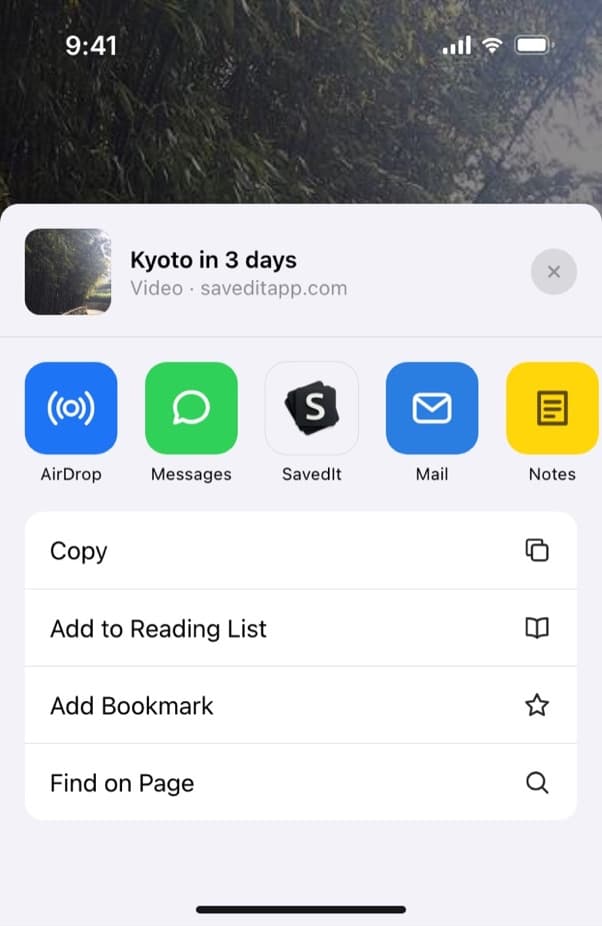
Send a post you liked to SavedIt from the share menu. Add a note and a collection
Before it saves, write why you kept it: "gift idea for Sam" or "try this hike in spring". Pick a collection like Recipes or Japan trip, and it's filed before you're back in your feed.
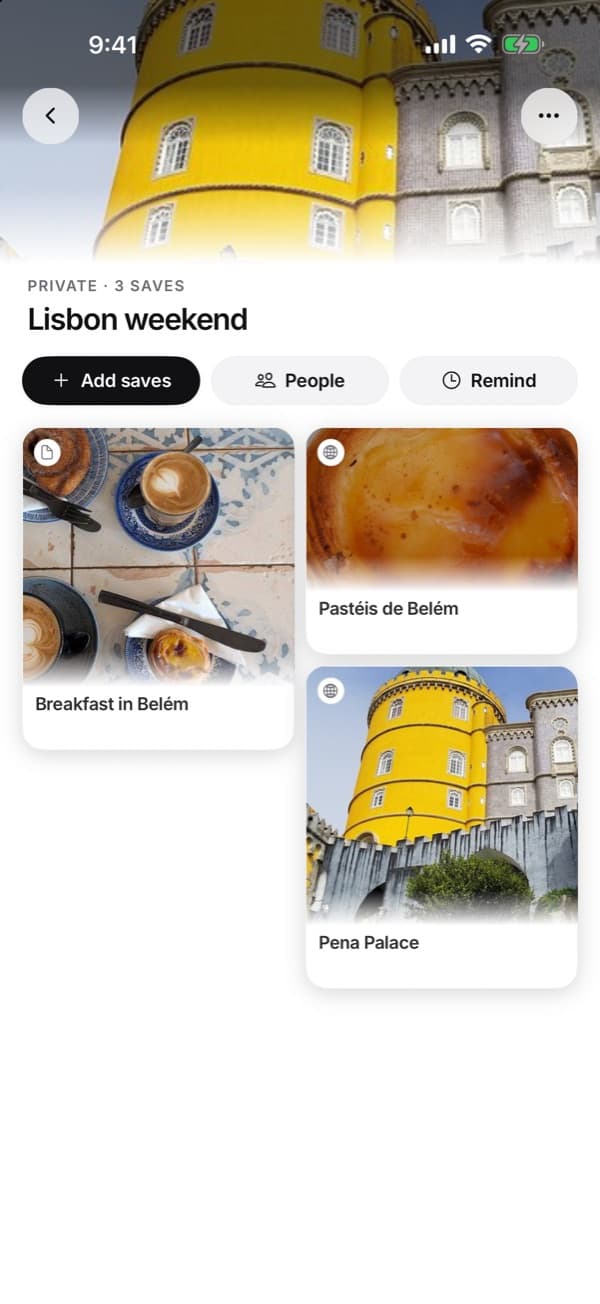
One collection per plan, with saves from Instagram and anywhere else. Find it by what you remember
Type any word you remember: a dish, a city, a brand, the creator. If the words don't match, tap Search by meaning and describe it instead, like "that cabin with the round window". Search by meaning has a monthly allowance on Free and no limit on Plus.
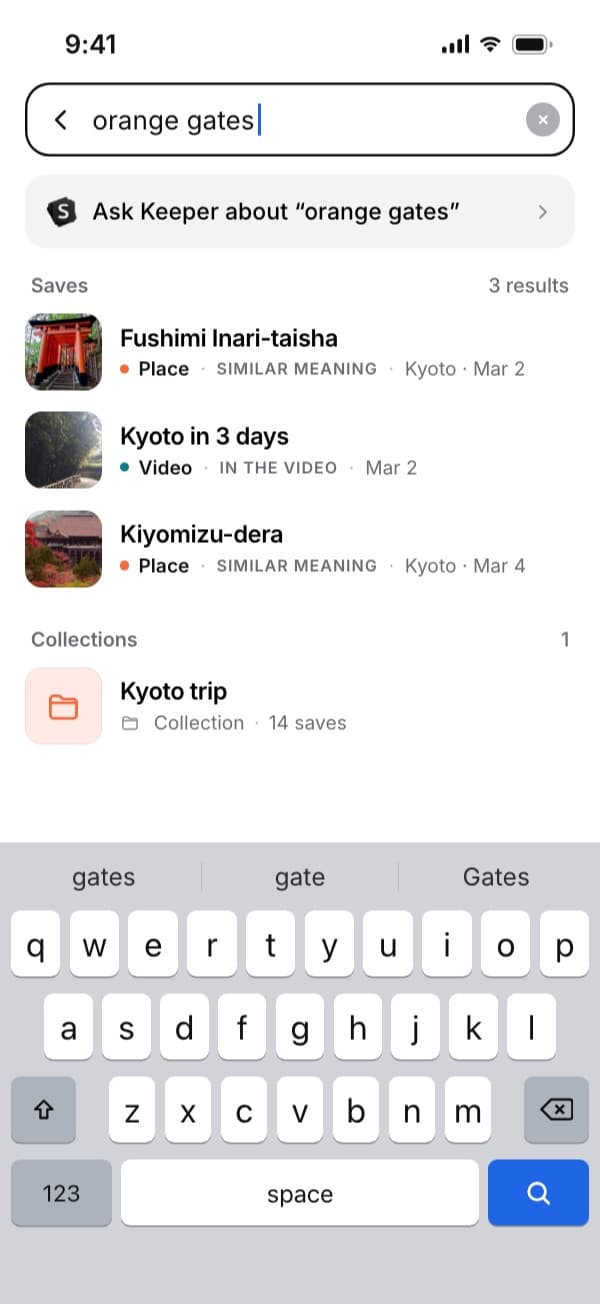
A search for "orange gates" brings up the Kyoto saves. Go back to the original post
Every save keeps its link. Tap Open in Instagram on the save and you're back on the post, with the full video and the comments. If the post is deleted later, the link stops working, but your save and your note stay in SavedIt until you delete them.
Questions people ask
How do I see Reels I liked on Instagram?
Reels you liked are in the same list as photos: Profile, Menu, Your activity, Likes. There's no Reels-only filter, so use All authors or All dates to narrow it down.
Can I see more than 300 liked posts on Instagram?
Not in Likes, which shows only your 300 most recent. For an older one, open the creator's profile and look there.
Can I see my liked posts on a computer?
Yes. At instagram.com, click Menu in the bottom left, then Your Activity, Interactions and Likes. The same 300 limit applies, and Sort & Filter and Select are there too.
Why did a post disappear from my likes?
Three things remove it: the person who posted it deleted it, it fell past your 300 most recent likes, or you unliked it by tapping the red heart.
Can other people see the posts I like?
The account that posted it always can. For everyone else, go to Profile, Menu, Likes you've made, and choose everyone, people you follow, close friends or no one.
How do I see Reels my friends liked?
Open Reels and tap Friends at the top. It shows public reels your friends have liked, commented on, made or reposted. Tap Reels to go back to your usual feed.
How do I like or unlike a post on Instagram?
Double-tap the photo or video, or tap the heart below it. To take a like back, tap the red heart. For many posts at once, use Select in Likes.
Does unliking a post notify anyone?
The like alert leaves the poster's Activity soon after you unlike. If they have push notifications on, they already got one when you liked it, and unliking doesn't take that back.
Is liking the same as saving on Instagram?
No. The poster can see your like, and Likes keeps only your last 300. A save is private, stays in Saved and can go into a collection. Both shape what Instagram shows you, and neither list has a search box.
Where are the posts I saved, not liked?
In a separate list under Profile, Menu, Saved. A post you liked isn't saved unless you also tapped the save icon.
Can SavedIt bring in my Instagram likes?
No. Your likes stay in Instagram. Open Likes, and share the posts worth keeping to SavedIt one at a time.
More guides
Free on iPhone and Android
Find a liked post again without scrolling
Share it to SavedIt, add a note, and search for it by what you remember.