

Instagram shared collections: how to save posts with friends
Short answer
Press and hold Save under a post, tap New collection, then Add people to this collection; or tap Save on a post someone sent in a chat. The collection lives in that chat, and everyone in it can see it, add or remove posts, or delete it.
Updated November 18, 2026 4 min read
What changed: Re-checked every step against Instagram's help, and added what to check when a shared collection only shows for you.
Make a shared collection on Instagram
Instagram calls it a collaborative collection. It belongs to a chat, and its help gives steps for the iPhone, iPad and Android apps only, none for a computer.
From any post
Tap Hold Save, then New collection, then Add people to this collection.
Press and hold the Save icon under a post, tap New collection, give it a name, then tap Add people to this collection and pick friends. You can add up to 250 people.
From a chat
Tap Messages, then Open a chat, then Save on a post, then New collection.
In a chat, tap Save next to a post someone shared, then New collection. You may need to tap Try it first. Everyone in that chat gets it.
Find it again
Tap Messages, then Open the chat, then Tap the chat name.
Shared collections live with the chat. Open the chat and tap its name at the top to see them.
If it only shows for you
Check three things. Was it made with Add people or in a chat? A collection you made on your own first can never be shared. Is your friend still in that chat? Leaving it takes the collection away. Are they in the phone app? The help page has no steps for a computer.
Remove someone, or leave
Remove the person from the chat, or leave it yourself. Anyone who leaves the chat can no longer see its collections.
What Instagram's help says, and what it doesn't
- Everyone can change everything
- Anyone who can see a collaborative collection can add posts, remove posts, or delete the whole collection, whoever made it. The chat is told when it's deleted.Source: Instagram Help: collaborative collections
- A private collection can't become shared
- A collection you already made on your own can't be shared, and a shared one can't be made private later. Start a new one and save the posts into it again.Source: Instagram Help: collaborative collections
- Some posts show only for some people
- A post from a private account shows only to people who follow that account. A post its creator deletes is removed from the collection for everyone.Source: Instagram Help: collaborative collections
- "Only works for the person who made it"
- A recent r/Instagram thread with that complaint ranks high on Google. Instagram's help says the opposite: everyone in the chat can see the collection and add to it. It doesn't mention this problem or a fix, so try the three checks above, then report it in the app.
- Instagram posts only
- A collaborative collection holds Instagram posts and Reels. A TikTok, a YouTube video or a booking link for the same plan has to live somewhere else.
Instagram's shared collections and SavedIt
| SavedIt | ||
|---|---|---|
| Who can add saves | Everyone in it | Who you choose |
| View-only members | Not included | Included |
| Saves from other apps | Not included | Included |
Plan together in SavedIt, from any app
SavedIt's shared collections hold Reels, TikToks, YouTube videos and links side by side. You choose who can add to it and who can only look, and people can like and comment on each save, on a phone or a laptop. It doesn't change anything in Instagram: your Instagram collections stay where they are.
Make a collection for the plan
Tap Share, then SavedIt, then Pick the collection.
Call it Lisbon trip, Gift ideas or Weeknight dinners. Save into it from any app with Share, then SavedIt.
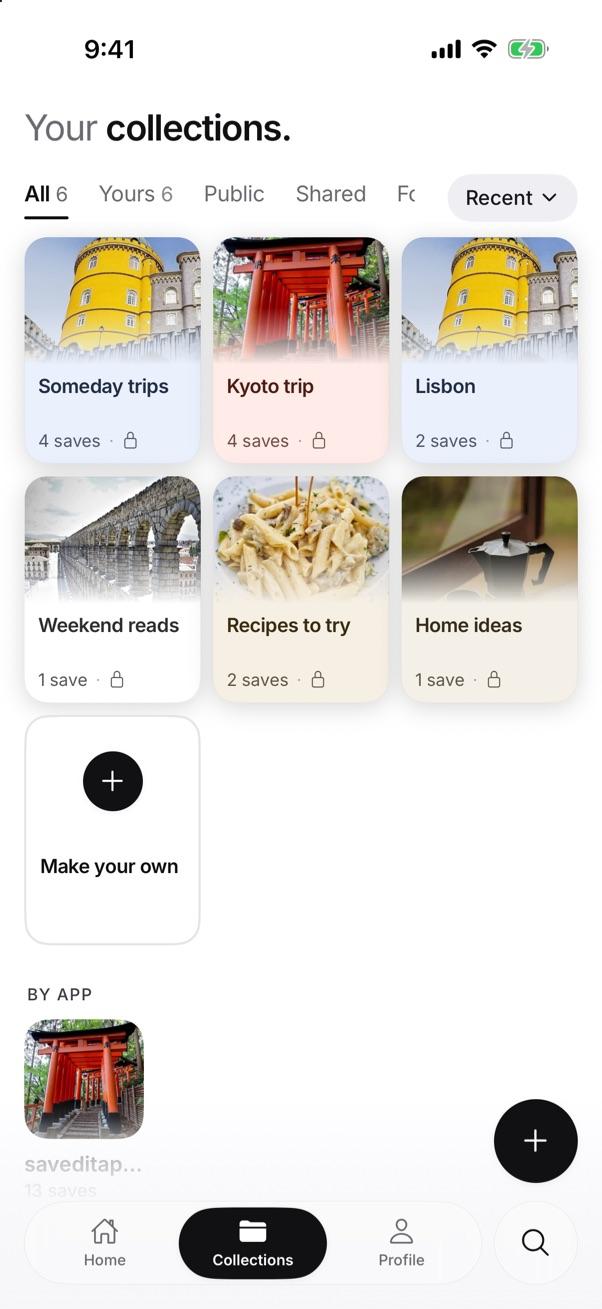
Your collections in SavedIt. Any of them can be shared. Invite people and pick their role
Tap Collection, then People, then Invite people.
Pick what each person can do: Can edit to add saves, or Can view to look, like and comment. As the owner you can also turn on a link so anyone who has it can add saves. Change a role or remove someone at any time.
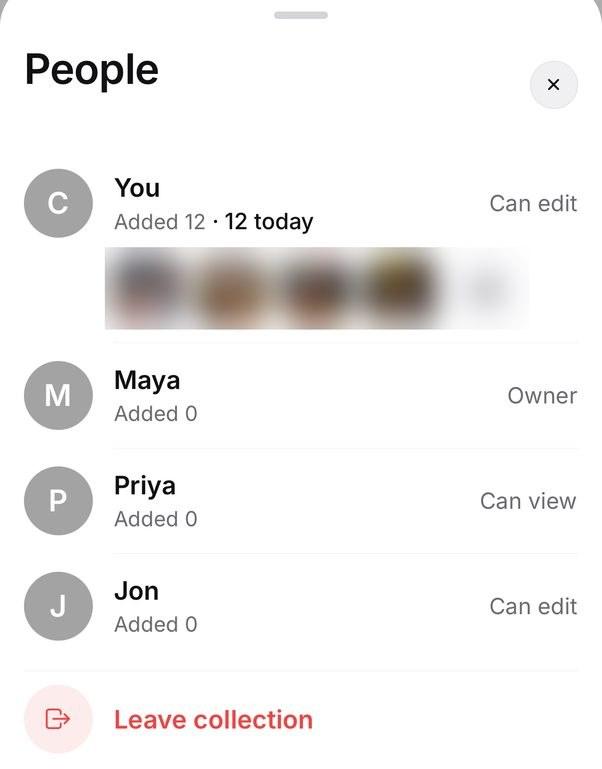
Each person has a role: Owner, Can edit or Can view. Like and comment on each save
People in the collection can like a save and leave a comment on it, so the plan happens next to the post itself, not in a chat thread that scrolls away.
Find it later by what you remember
SavedIt reads each save, so you can search "the pasta with garlic" or "rooftop bar" instead of scrolling.
Questions people ask
How do I make a shared collection on Instagram?
Press and hold Save under a post, tap New collection, name it, then tap Add people to this collection. Or tap Save on a post shared in a chat and choose New collection.
Can I share a collection I already made?
No. Instagram's help says a collection you made on your own can't be shared. Make a new collaborative one and save the posts into it again.
Can someone in my shared collection delete it?
Yes. Instagram lets anyone who can see a collaborative collection delete it, and the chat is told. In SavedIt, you choose who can edit and who can only view.
Why can't my friend see our shared collection?
Shared collections belong to a chat. If your friend left the chat or was removed, they lose the collection too. If you made the collection on your own first, it was never shared. A post from a private account they don't follow won't show for them.
Is SavedIt free for sharing with friends?
Yes. Shared collections, likes and comments are free on your phone or laptop, for you and everyone you invite.
More guides
- Save Instagram, TikTok, YouTube, Reddit and X posts in one place
- Where are saved posts on Instagram? Find them and search them
- How to sort and find saved Reels on Instagram
- How to find a Reel someone sent you on Instagram
Free on iPhone and Android
One shared list for the whole plan
SavedIt is free on iPhone, Android and the web. Make a collection and invite a friend.