

How to see your Facebook watch history (videos and Reels)
Short answer
In the app, open Reels or Video, tap your profile icon, then History. On a computer, open your Activity Log and look for Videos you've watched; Facebook's own help no longer documents either route.
Updated November 18, 2026 5 min read
What changed: Rewrote it after Facebook's help stopped mentioning watched videos: each route now says who reports it and when.
Where to look in Facebook
Facebook's help pages explain the Activity Log but no longer say where the videos you watched are. The routes below are the ones people report working in 2026, with the date and source of each. Menus differ by app version, so try them in order.
Reels you watched: Reels, then History
Tap Reels, then Profile icon, then History.
Tap Reels (at the bottom on iPhone, at the top on Android), then the profile icon or the three dots in the top right, then History. Older versions of the app call it Watched reels. WebTrickz reported this route in August 2026 and says it keeps about the last 30 days.
Other videos: Video, then History
Tap Video, then Profile icon, then History.
Tap Video, then your profile icon at the top, then History. Facebook's own answer page, which it marks as AI-written, gives this route and adds that for some people it has moved or gone. If you don't see it, use the Activity Log below.
On a computer: Activity Log
Tap Profile picture, then Settings & Privacy, then Activity Log.
Click your profile picture in the top right, select Settings & Privacy, then click Activity Log. Guides from 2024 to 2026 report a Videos you've watched section there, with the date and time of each view. Filter by Date to get close to the day you watched it.
In the app's Activity Log
Tap Menu, then Your name, then Options, then Activity Log.
Tap Menu, then your name, then Options below your profile picture, then Activity Log. On Android, Facebook's help skips tapping your name. Tap Activity History at the top, then Filters, then Categories or Date, and look for your video activity.
Check Saved and Liked Reels too
Tap Menu, then Your name, then Reels, then Saved.
If you saved or liked the video, it's quicker to look there. Tap Menu, then your name, then Reels, then Saved or Liked. On a computer you can see Saved Reels; liked ones are only in the app.
What Facebook says, and what it doesn't
- Its help no longer names watched videos
- Facebook's Activity Log help lists your activity across Facebook and logged information like location and search history. The iPhone, Android and computer versions no longer mention videos you've watched.Source: Facebook Help
- Reels history looks short
- The Reels History list is reported to keep about the last 30 days. Facebook hasn't published a number, so for anything older, check Saved and Liked.Source: WebTrickz, August 2026
- Reports disagree on Reels in the Activity Log
- A 2024 guide found Reels missing from video watch history, while a 2026 guide says Reels and videos show together. Look in Reels History first for a Reel.Source: iDownloadBlog, February 2024
- Only you can see your Activity Log
- The log is visible only to you. The posts in it may still show elsewhere on Facebook, like on your profile, but the list itself is yours.Source: Facebook Help
- You narrow it by date, category and people
- The Activity Log has filters for categories, a date range and people. Facebook's help doesn't describe a search for what happened in a video, so you find it by when you watched it.Source: Facebook Help
- Saved and liked Reels have their own page
- Reels and videos you saved or liked are under Reels on your profile, and only you can see those pages. Liked ones show in the app, not on a computer.Source: Facebook Help
Keep the videos worth finding, and search them by what you remember
Your Activity Log is a record of everything you did on Facebook, in date order. SavedIt is for the few videos you want again. Share one to SavedIt and you find it later by the recipe, the place or a word you remember, not by the day you watched it.
Share the video to SavedIt
Tap Share, then SavedIt.
Tap Share under a Facebook video or Reel, open the phone's share sheet from there, then pick SavedIt. You stay in Facebook while it saves. It works on a video you just found in your Activity Log too, so you never dig for it twice.
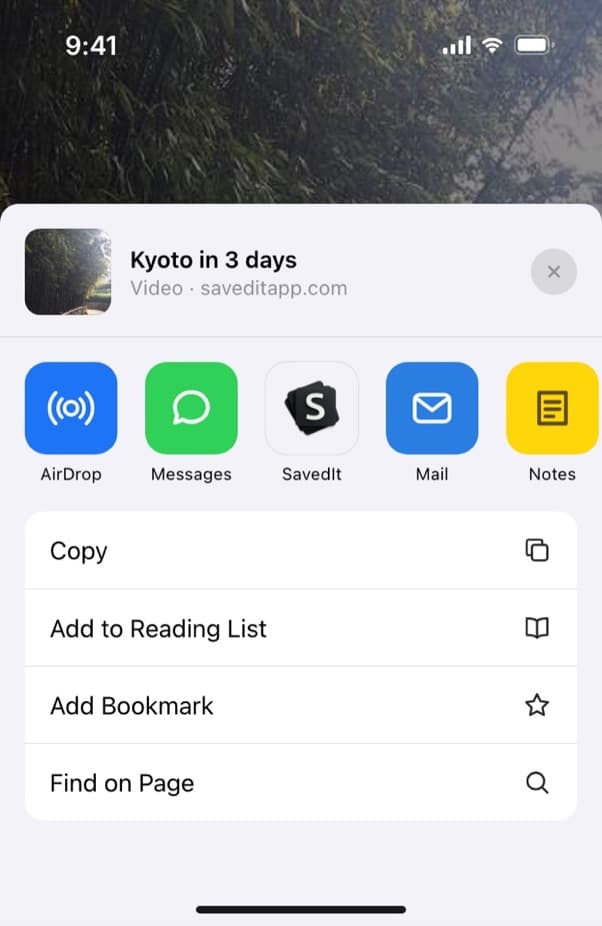
From Share in Facebook, open the share sheet and pick SavedIt. Add a note while it saves
Write why you kept it: "try this Sunday", "gift idea for Sam", "bar near the hotel". Pick a collection like Recipes or Lisbon trip if you want it filed. Both are optional.
Search by what you remember
Type "lemon pasta" or "rooftop bar Lisbon". When the words find nothing, describe it instead, like "the pasta with the lemon and chili", and SavedIt finds it by meaning. Search is free and has no limit.
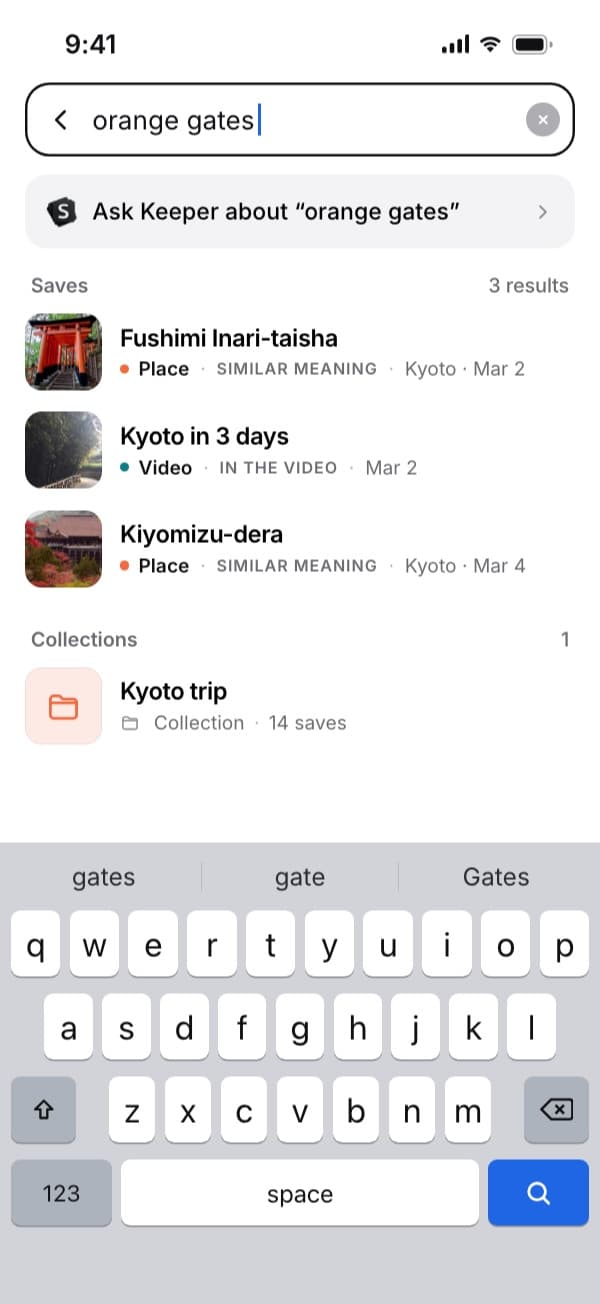
Search by what you remember, not by the day you saw it. Open the original in one tap
Every save keeps its link. Tap it and the video opens on Facebook, with the sound and the comments. SavedIt keeps the link and what it reads from the post, not a downloaded copy of the video.
Keep Reels, TikToks and YouTube videos next to them
The same Share, then SavedIt works in Instagram, TikTok, YouTube and your browser. A recipe from Facebook and a recipe from TikTok land in the same library, and one search finds both, on your phone or laptop.
Questions people ask
Where is my Facebook watch history?
Facebook's help no longer says. In the app, try Reels or Video, then your profile icon, then History. On a computer, open Activity Log from Settings & Privacy and look for Videos you've watched.
Can other people see the videos I watched on Facebook?
Your Activity Log is visible only to you. Facebook says the posts in it may appear in other places, like your profile, but the log itself is yours.
How do I find Reels I watched on Facebook?
Tap Reels, then the profile icon or three dots, then History (Watched reels on older versions). It's reported to keep about 30 days. If you saved or liked the Reel, tap Menu, then your name, then Reels, then Saved or Liked.
Can I search my Facebook watch history?
You can filter it by category, date and people. Facebook's help doesn't describe a search for what was in a video, so set the dates as close as you can and scroll.
How do I clear my Facebook watch history?
Facebook's help says to tap Options next to an entry in your Activity Log to manage it. Guides also describe a Clear video watch history button in Videos you've watched, but Facebook's help doesn't, so check whether your app has it.
Why can't I find watch history on Facebook?
Facebook has moved it between app versions and doesn't document it. Update the app, then try Reels History, Video History and the Activity Log in turn. If a video isn't in any of them, Facebook may not have kept it.
Can SavedIt read my Facebook watch history?
No. SavedIt doesn't read your Facebook history, likes or saves. Share a video to SavedIt as you watch it, or when you find it again in your Activity Log.
More guides
- Where to find your saved posts on Facebook
- How to see liked posts on Facebook
- How to see your Instagram watch history, and clear it
- Where is TikTok watch history? Find a video you watched
- Save Instagram, TikTok, YouTube, Reddit and X posts in one place
Free on iPhone and Android
Stop scrolling your Activity Log for one video
Save the good ones to SavedIt and find them by the recipe, the place or a word. Free on your phone or laptop.